16
Sep
2008
31

Utilize Space Efficiently for a Better UI

One thing that makes a user interface (UI) great is efficient space utilization. Good designers are able to find elegant ways to lay out buttons, controls and menus on the screen that are able to both, utilize space efficiently and put all the controls where the user would expect them to be.

Here’s an example of how a blog interface can utilize space better. This is a small segment of the TechCrunch comments section:
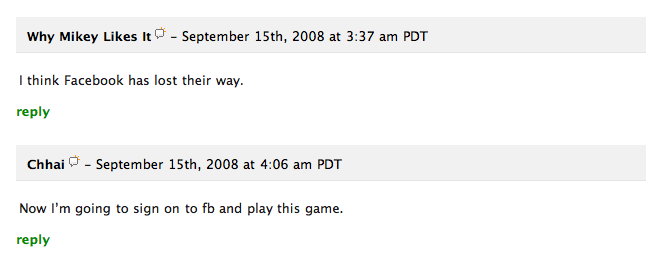
Looks pretty good… however, there’s one thing bugging me here: those reply links. Every comment has a reply link under it; to my eyes it breaks the flow of the commentary. When I’m reading down the page, I read people’s names and then their comments. Those reply links not only get in the way, they also take up a lot of vertical space and stretch out the page longer than it should be.

What’s interesting in this case is that the solution is staring  us right in the face. Why not put the reply link in the bar which contains the person’s name and date stamp, floated right? Here’s my mockup:

This makes the UI cleaner. It saves vertical space, making the page length considerably smaller. It also sits next to the name of the person who posted the comment, so there won’t be any confusion as to whom you’re replying to.

When you add new buttons, links and other elements to your interface, have a look around — see if there is space already available somewhere near. Elements that you won’t use most of the time should be put away to the side, out of the way. A lot of the time you’ll find unused space on the right hand side simply because we read and write left to right and so tend to put most stuff on the left. I think little optimizations like this can improve the flow of the page and give the relevant content more focus.

Share/Save/Bookmark

Enjoyed reading this post?
Grab the RSS feed here and get all new posts delivered straight to you.

31 Comments:

  1. Thomas

    Something to be aware of: if the width gets too wide the “reply” link will be easily overlooked. I’ve seen it happen myself and it was reported to have happened by one of the speakers at the recent “An Event Apart” in SF.

    What’s most surprising is that “too wide” is much shorter than you might suspect so be sure to test.

  2. Jin

    I like clear distinctions between elements on a UI, either though contrast or color/lines.

    I’m still experimenting with my site layout. I started it bare, and observe the usage via google-analytics as I make small modifications. It’s been quite interesting.

  3. Josso

    Agreed!

    Reply and other links, shouldn’t waste vertical space.

    - Josso

  4. Razvan Girmacea

    Great observation there Dmitry

  5. Dmitry

    Great point Thomas. I do think if people wanted to reply to a particular comment they’d be looking for the reply link explicitly, and so would probably find it — but definitely test if you can.

    Actually I’ve noticed this same reply link style in the Disqus (www.disqus.com) comment engine. I wanted to use them as an example, but they’ve recently updated their UI and so it’s more difficult to provide a clean solution like the TechCrunch example above.

    Jin: Your layout is a little confusing to navigate, but it’s most certainly original :)

  6. Paul Smith

    One other thing that is bugging me about your version is that, in my mind, I’m not replying to a person, I’m replying to their comment. So to me the reply button underneath makes more sense to me.

  7. Michael

    @Thomas, @Paul Smith
    I like the points you two have brought up.

    It is easy to get sucked into details while dealing with usability. In this example, we are saving vertical space and improving the flow of reading through a series of comments. The downfall is that the ‘reply’ is now a little more vague - are we replying to the user (PM) or the comment.

    Possibly rewording ‘Reply’ to ‘Reply to comment’ would help.

  8. Jin

    I think another solution would be to have “(reply)” link at the end of the last sentence in the comment(on the same line). in a smaller font. This way, it won’t be confusing and still solve the vertical space issue.

  9. mike

    I looked down here to see if you had a ‘reply’ link under every comment

  10. Cagatay

    Hello from Turkey.

    Totally agreed.

  11. Janko

    Excellent point!

  12. Srikanth

    IMO, the placement of “Reply” link works well as Dmitry suggested when the page has a fixed width. If the width is fixed, then finding it wouldn’t be a problem. And I liked Michael’s suggestion to rename it as “Reply to Comment”.

    Great suggestions!

  13. Nacho

    Wow, just moving a link, made the UI much much better.
    Your are definetely good :p

  14. Andy

    In my opinion, the spacing between lines is a bit off. The relationship between the date stamp, the comment and the reply isn’t tight enough.

    I wonder what would happen if there was also a minor indentation of the actual comment line?

  15. Dmitry

    Andy: I think we know what would happen if we indented the comment ;) I agree that it needs tightening up — there’s a tiny bit too much whitespace between the name bar and the comment itself.

  16. Steve

    Missing one important factor:

    If the reply is quite long, you force the user to scroll up in order to reply to it. I believe the reply must be at the bottom as its the next logical user interaction after reading a post. How that is presented is up for debate.

    i like to do sort of a stylized utility bar floated right and beneath the post.
    It usually includes things like digg style interaction (thumbs up/thumbs down), reply, quote, etc. Icons (design permitting) seem to be most effective.

  17. Dmitry

    Good point Steve.

    However, you must also consider the percentage of users who read the comments would actually press the button — it’s a small number. What’s more, there are generally more short comments than long comments. So basically I would improve the flow for most visitors, while sacrificing a slightly easier access to the button for some. Weigh both versions and see which one is more beneficial to more people.

  18. Andrei Gonzales

    I’m with Steve here.

    I think a graphical divider above the reply link, or making it look like an actual button, would have been a better approach.

    Either way, keep up the great work. Love your blog.

  19. voladia

    http://www.rockymountainnews.com/ does an excellent job at displaying comments.

  20. Steve

    If the amount of users that reply is low - we should be trying to facilitate more interaction. Not make it more difficult. Every minor hurdle that makes the user work harder to do something means lower user involvement overall.

    The other side of this is the question; at what point does compact become too compressed?

    A small gap (or other visual reference) between responses can make things much easier to scan. Tightening it up means users have to pay more attention to text, and cant rely on visual clues as much. Im not saying users rely on a gap exclusively - but it certainly doesnt hurt.

    That said - its all about context.

    A newspaper site for instance usually facilitates verbose responses and typically older audiences. As such, i would certainly favor a bottom reply button.

    On a consumable site (video sharing, photo sharing, etc), replies are generally short and the audience is typically young. Its completely debatable where it should go, but i would certainly re-evaluate the method you describe and see if it works in whatever project im working on. Given the proper content and audience - that method is likely ideal.

    More and more mainstream sites use a setup like you’ve described. Youtube for example. Internet junkies have been trained to use that system. The more casual internet user is less likely to find it intuitive.

    Context always screws with my logic.

  21. [...] Utilize Space Efficiently for Better UI by Usability Post [...]

  22. Suffian

    Nice post. I always like interfaces that are simply easy on the eyes. That’s an immediate indication of readability and flow, for me. Only after that do I start using my brain to analyze it according to design rules. =P

  23. Jon Thomas

    I like the small move. An additional idea to solve the lack of attention “reply” now receives is to give it the green background the size of the author bar. Your eye will notice it right away and get used to it as you scroll. I don’t think it would be intrusive. You keep the flow, shorten the vertical size, and are constantly reminded that reply is to the right by something that jumps out a little more, but is still off to the side.

  24. [...] Post is a blog about design usability. A couple of blog posts you’ll find share tips on using white space to improve User Interface and using Photoshop color profiles for web [...]

  25. [...] Post is a blog about design usability. A couple of blog posts you’ll find share tips on using white space to improve User Interface and using Photoshop color profiles for web [...]

  26. [...] Usability Post是一个关于可用性设计的博客。博客文章中提到了很多技巧,比如用页面空白改进用户界面、用Photoshop颜色配置文件设计web图像等。 [...]

  27. [...] Usability Post是一个关于可用性设计的博客。博客文章中提到了很多技巧,比如用页面空白改进用户界面、用Photoshop颜色配置文件设计web图像等。 [...]

  28. [...]   Usability Post是一个关于可用性设计的博客。博客文章中提到了很多技巧,比如用页面空白改进用户界面、用Photoshop颜色配置文件设计web图像等。 [...]

  29. [...] Usability Post是一个关于可用性设计的博客。博客文章中提到了很多技巧,比如用页面空白改进用户界面、用Photoshop颜色配置文件设计web图像等。 [...]

  30. [...] Usability Post是一个关于可用性设计的博客。博客文章中提到了很多技巧,比如用页面空白改进用户界面、用Photoshop颜色配置文件设计web图像等。 [...]

  31. [...] Usability Post是一个关于可用性设计的博客。博客文章中提到了很多技巧,比如用页面空白改进用户界面、用Photoshop颜色配置文件设计web图像等。 [...]

Post your comment

Credits: RSS icon designed by Function.
Powered by WordPress.