19
Sep
2008
17
Using the Scrollbar to Display Information
This is really cool. Greg from Raizlabs has pointed out that Google Chrome uses the scrollbar to show search results frequency. I haven’t noticed this before and it has really impressed me because it’s a very clever feature. Here’s what it looks like when you do a search on a page:
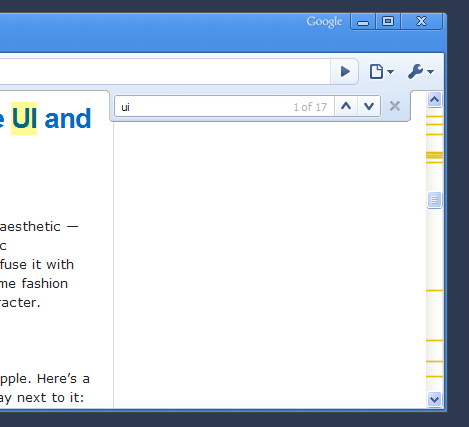
You can see a bunch of yellow stripes in the scrollbar on the right. This shows where the term I searched for appears on the page. Would definitely love to see this implemented in other ways, for example on search engine pages as Greg suggests, as well as in other applications.
I remember seeing this in Eclipse before, where it shows all the ocurring errors (?) within the document.
Definetly a good idea to put this in a browser.
It’s also been used in IRC clients - Colloquy for Mac uses notches to indicate positions in the conversation where someone has mentioned your nickname.
Very cool to see it implemented in the browser for in-line search.
And there I thought this was revolutionary :) Still, I think this could definitely be used more.
Also check out the scrollbar in Adobe Buzzword…it has page numbers on it…and maybe more?
I haven’t noticed that either. It’s similar to RockScroll (http://www.hanselman.com/blog/IntroducingRockScroll.aspx)
yes, eclipse has this feature for all occurrences of errors and for selected text (be it variables, methods, etc)
It reminds me of some diff programs. It would be cool to actually use this to show diffs based on the current version of a page and the old cached version.
It’s very convenient, but I’ve also noticed some visual rendering issues with the scrollbar intermittently disappearing or not being displayed correctly. I’m using Vista x32, and experience no visual problems with any other software.
I like this feature as well. Pre-Chrome, my favorite results display is that of Safari’s. I think a combination of Chrome’s scroll bar indication and Safari’s onpage highlight would make good combination, espectially for a page that has very long content.
Years ago, I spotted this in Apple’s FileMerge (DevTools) at first, but I dont’t think they invented it. Nevertheless, it’s am brilliant feature for a web browser.
Im with Aaron - very reminiscent of diff programs. However - in diff programs i use - these results dont show up in the scrollbar. They show up in the line number area. Which keeps the 2 concepts separate.
So, they have merged scrolling and results into 1 area which is good (since it provides a relative placement on the page) but is also bad because it muddles scrollbar.
It’ll probably grow on me, but for now im on the fence.
Hi, I found your blog on this new directory of WordPress Blogs at blackhatbootcamp.com/listofwordpressblogs. I dont know how your blog came up, must have been a typo, i duno. Anyways, I just clicked it and here I am. Your blog looks good. Have a nice day. James.
it’s funny, the more i use Chrome (for windows), the more unstable it seems to get… crashes a lot more, can’t handle sites with flash, hangs every time i close a tab… all that to say, i’m switching back to Firefox
[...] 19th, 2008 · No Comments Via Usability Post: This is really cool. Greg from Raizlabs has pointed out that Google Chrome uses the scrollbar to [...]
Hones to God I thought it was a rendering error :P
i realised that function a few days ago. Handy.
Keep up good work.
http://artgorbunov.ru/bb/ui/infoscroller/
31.10.2006 ;)