Use Whitespace to Indicate Relationships Between Content Elements
One of the most important tools in a designer’s toolbox is whitespace. Whitespace is just that — it’s space between various content pieces, like paragraphs, headings, buttons and so on. This space can be tweaked to achieve different effects — such as to separate elements apart from each other by increasing the amount of space or group related things together by tightening it.
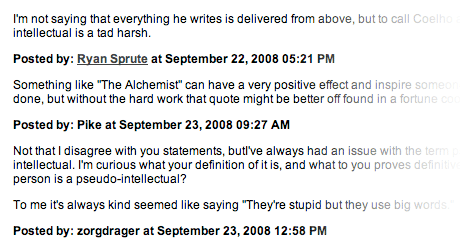
It’s also one of the things that’s easy to mess up if you stop paying attention to it. Here’s a segment of the comments section taken from Ryan Holiday’s blog:

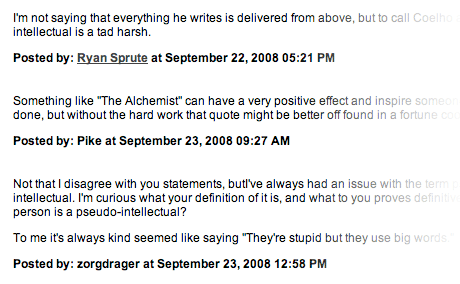
Can you tell which person made which comment? It’s pretty much impossible unless you check the very first comment to see if it has a name label above it or not. The names are posted under the comments in this case. I don’t particularly like this flow of content, but it doesn’t really matter — what’s important is that we can make this comments section much more readable by tweaking the whitespace between each comment. Here’s my redesigned version:

While it’s not perfect, it’s definitely an improvement. By increasing the space between each comment we’ve separated them apart — each comment is a separate piece of content now. I’ve kept the same space between the name label and the comment text to keep those two things together. Both the text and the name are part of the same comment.
Here’s an example from the WordPress admin panel. This is a portion of the sidebar you see when writing new content in WordPress:
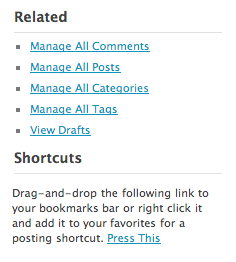
It looks pretty good. What’s bothering me is the distance between the heading and the content to which it relates to. Look at how far away the word “Shortcuts” is from the text below it. Now look at the distance between it and the links above. The heading is closer to the stuff above it than to the content it’s meant to be tied to.
The horizontal line is to blame here, which I don’t think adds very much value. Here’s my version with the space tightened between the elements:
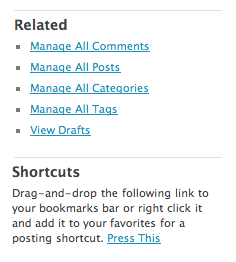
I’ve flipped the horizontal divider line above the heading — it now separates the heading and its content from other content above it. More important, I’ve decreased the distance between the heading and its content, clearly showing the relationship between those two elements.
Clearly linking together various related bits of content on your page is very important. Your visitors are impatient — they scan pages. People don’t read everything and they don’t look at your interface for very long either, so it must be clear at a glance which bits are tied to each other are what bits are separate. Using whitespace to do this is the easiest way to manage these relationships.
Have any examples or thoughts to share? Please leave a comment.
24 Sep, 2008
Great examples, Dmitry. The appropriate use of whitespace can be a struggle when there’s a lot of content to display, but as you’ve shown here it only takes minor adjustments to increase the clarity. Well done. :)
25 Sep, 2008
You make a good point, it bothers me too I just never got called out enough to make it the priority it deserves.
I’m curious though, how did you find me/decide on my comment section? I’m obviously not the only site doing it.
25 Sep, 2008
Hi Ryan,
I subscribe to your blog (I think I found it through a Copyblogger reference, can’t really remember). I’ve picked it because it’s something I “use”. The other Rudius blogs are also guilty of this :)
25 Sep, 2008
I feel this is article suggests a very good point that’s often overlooked by many webdesigners and developers.
In print, white space is important in separating content and showing the relationships between content or used to visually balance the piece. In web and app work, screen real estate is always precious and too often, too much content is crammed together on a screen, creating visual clutter for the user.
An argument for this practice could be an attempt to reduce the number of page loads or transitions the user/viewer has to endure. I feel this isn’t a good argument because the mind can benefit from these little rests or breaks in the stream of information without disrupting the user’s flow.
Content on the web can benefit from more whitespace by breaking it up into smaller, more mentally digestable chunks. Reading a lot of text on screen strains the eye and using whitespace effectively can reduce the user’s mental fatigue without diluting the content.
25 Sep, 2008
Dmitry, get out of my head please. It seems you’re always one step ahead of me.
White space, or negative space is a powerful tool in presentation, because it allows the audience to fill in the gap themselves mentally. It divides without being explicit. It serves layout very well without having the need for extra elaborations(lines, colors etc).
25 Sep, 2008
I’m in your head, stealin’ your post ideas ;)
Whitespace is also useful to manage attention focus. By creating gaps between groups of content elements, you create little anchors of content — areas of the page that grab the users attention because they’re separated from the rest.
If it’s all tightly packed, the user has nowhere to land their gaze as they scan the page, which forces them to read a lot more of the page than they want to. This is of course dangerous, as impatient visitors will leave if they can’t find what they’re looking for.
25 Sep, 2008
Sometimes I should just learn to be more confident instead of being afraid by using to much white space.
25 Sep, 2008
Nice post, and good points made. It is small details like this that can really show expertise in a user interface design. It is not merely web design, it is user interface design. There is a huge difference.
Thanks for this post Dmitry
25 Sep, 2008
[...] Visit Source. [...]
26 Sep, 2008
A follow-up post on Gestalt Principles of Psychology might fill out the subject - proximity, similarity, etc.
When using whitespace this is really what we’re working at achieving.
And the difference between positive and negative whitespace is important to grasp as well. But it’s a good subject to broach because even teaching Graphic Artists in the making at Diploma level last year I was surprised that they hadn’t been formally introduced to the theory behind why whitespace is useful. Gestalt who?
While our minds are pre-wired to try and make sense of the world around us, whitespace and contrast and similarity etc are natural tools that facilitate the identification of differentation, sameness and relationships in the design.
It’s serioulsy scarey when you’re working on a design team and someone new to the field starts saying “hey we need to fill in that empty area”… it scares them.
You’ll notice the difference between lorem ipsum and the real content, too. Just that difference in the white space, its jagged edges and where the paragraphs start and end, all make a large difference to the design.
at this point I know I’m a geek - nobody needs to tell me anymore :)
26 Sep, 2008
[...] Visit Source. [...]
26 Sep, 2008
Hi,
good read and an important point.
On a side note, for a long time now I have set the view of all my mails (sending and receiving) to ‘Text Only’. This means that I cannot see any text markup (colours, bold, italic, etc) and in writing a mail I cannot use markup either.
This forces me to think about my writing style but also about the layout aspect: how can I present my information so that it reads easily? Very often this is through intelligent use of whitespace!
Stijn.
26 Sep, 2008
[...] Design & Product Experience… http://www.usabilitypost.com/2.....tent-ele... Whitespace and its role in shaping website [...]
28 Sep, 2008
I agree wholeheartedly with your first (simple) redesign attempt, although I’d suggest a different approach for the Wordpress scrap:
Keep the lines as they are, increase the whitespace between the two modules though, to help them differentiate.
That way, the borders can be omitted too, if the designer wishes to go for a simpler approach.
1 Oct, 2008
Great article indeed.
The whitespace for me it’s very important, because i dont like to be bombed with useless elements. I like minimalist designs, and of course, whitespaces :)
Just came to this site trough delicious.com, didnt knew about it. I will sign the RSS feed! See ya later.
1 Oct, 2008
[...] Undefined Elements — This is something that I see mostly in blogs. When you have a lot of information from different posts all bunched together in one big blob, how does the average user distinguish what applies to where? I recently visited a blog that had such a piss-poor sense of organization, that I couldn’t even tell which post the dates applied to. I mean, no clear effort or consideration was given to the visitor. Think about people who think Photoshop is a verb, not a noun - people who don’t understand web design or structure. All they know is that the pretty stuff shows up on the page, and you read it. Make life easy for them. Use gratuitous white space. [...]
1 Oct, 2008
Sugarenia: Yep, that will work too. To me, the lines look more like dividers rather than underlines, which is why I used them in this way.
Valério: Thanks :)
2 Oct, 2008
[...] Visit Source [...]
3 Oct, 2008
Hi! The post is really interesting! I’ve read your blog and can say it’s a good job.
6 Oct, 2008
You have a very good point Dmitry and very well-stated on your example. Indeed! Using whitespace gives clarity in indicating displaying content elements.
6 Oct, 2008
It is really cool. I have read 2 articles but both are really good. :)
You have great blog.
11 Oct, 2008
[...] think white space is wasted [...]
17 Oct, 2008
[...] designs will be usable, with a focus on usability for the end [...]
25 Dec, 2008
Thanks very much for that blog.It is really cool.
http://www.relationshipsaver.org/