
Subscribe by RSS or Email
Recent Posts

Manage Focus Effectively Using Contrast

Most written content online is split up into various elements. For example, a blog post has the text body of the post, the headline, the author, the date, the comments link and so on. Not all these elements are equal in importance and there is a tool we can use to give the key elements more weight. This tool is contrast.

Here’s an example of what a blog post headline may look like, together with author and date labels:

Now, there are three elements in this example: the headline, the author’s name and the post date. The most important element is of course the headline — this is what all visitors are going to want to read. The second in hierarchy is the author — the reader will likely want to know who wrote the article. Finally, the least important element is the date. You may want to check when it article was written, but most of the time, you just won’t care.

What we can do is vary contrast across these three elements to build up a visual hierarchy. To decrease contrast of an element, we must shift its color closer to that of the background it sits on. By changing the black labels to grey and light grey, we can mould the contrast to the levels we want:

What the resulting image achieves is effective focus management. Our eyes focus on the most contrasting elements. Sure, the headline text is bigger, but it is also higher contrast so we focus on it first. Secondary focus falls on he author’s name; and then if we really want to, we can read the date — but essentially, the date label fades away.

To illustrate this point, let’s switch contrast around. Let’s give the date the most focus, and the headline the least. Here’s what we get:

It’s very effective. Without touching font sizes or changing colors, we’ve shifted the key elements on the page.

Let’s look at a real world example:
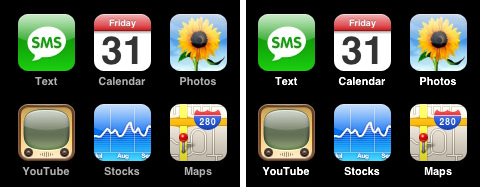
This is a portion of the iPhone home screen. On the left is the real home screen, and on the right is my edited version. You’ll notice that the labels for each iPhone application aren’t white — they’re grey. If Apple had used white, like my mockup on the right, they would give too much focus to the labels. The icons and the labels would be fighting for your attention. This causes too much noise.

Instead, the labels are secondary information that you check if you’re not sure what the icon is for — the icons are the things that are in focus, and the labels are shaded grey in order to take the back seat.

Contrast is one of the more powerful tools in your arsenal, so be sure to use it not only to give the most important things the focus they deserve, but to also remove any noise from secondary and tertiary elements on the page.

Share/Save/Bookmark

Enjoyed reading this post?
Grab the RSS feed here

19 Comments:

  1. I like this post a lot because as primarily a coder this contrast bit is the only design instinct I seem to have right. Different shades of grey, yea i got that on lockdown!

    Really enjoy the blog, keep up the good content.

  2. [...] Forget the Wireframes, Throw Away Your Boxy Layouts — Design BIG!   and I love this post on Manage Focus Effectively Using Contrast. It definitely aids in guiding the user to key pieces of information, now we just need to figure [...]

  3. Dmitry, your posts are wonderful. Keep them coming :) I really don’t have much to say.

  4. Thanks Dan and Srikanth :)

  5. Nice Article :)

  6. Excellent tip!… I’m currently working on the designs for my first “real” blog launch (other than my portfolio blog), and this one will help pull things together quite nicely.

    Lots of great info on UP — keep it comin!

  7. yes, contrast does play an important part, atleast sub consciously, in the mind of a reader

  8. Excellent article. Coding is somethign I feel pretty good at, but design I need more work and contrast looks to be a very helpful tool.

  9. Its a good post. But maybe theres is something missing here.

    I guess the first thing to do when you want to focus with contrast must be define and make groups with the hierarchy of elements.

    This means that is posible to group date and author elements in the same hierarchy group(sometimes the date is more important than the author - and much more in personal blogs, where the author is just one knowed person).

    So if you begin making groups of elements by hierarchy you’ll notice that the headline is one group and the date and autors could be joined in other (maybe called extra info) .

    This way you can paint the headline with black and the extra info with gray, so you dond have different color for each element(remember that less color bring less confusion when trying to understand a user interface).

    Sorry for my poor english, my first language is spanish. I hope you understand my text.

  10. Really nice post. I’ll definitely remember this on my next design. Thank you.

  11. [...] Read more about the contrast in design in an excellent article from the Usabilitypost. [...]

  12. I used the contrast sometimes, but know you make me think more at this and it is very useful.

  13. Really cool explanation of this topic. Thanks.

  14. Excellent post.

    Size is also a form of contrast, it was interesting (from your headline example) to see ‘colour’ over-power ’size’.

  15. Great write up, with great examples. I even see you’ve implemented that yourself on the RSS banner, sweet. Really loving your site dude, some real great reading.

  16. Truly nice…..Thank you very much for sharing such valuable thought

  17. Steven Archibald

    “Different shades of grey, yea i got that on lockdown!”

    And don’t we know it (the general public).

    Please can all web designers STOP using grey text? We, your customers, (or rather, your customers’ customers) are fed up of seeing grey text on grey backgrounds.

    Why don’t you use colours instead? Anything- just stop using low contrast text!

  18. Very nice post, I like the visual example from the iPhone interface, and surprisingly having both versions side by side gives quite noticeable difference.

    Thanks.

  19. Очень неплохо.

Leave a Reply