6
Oct
2008
26

How Usable is Your Copy?

When we talk about usability, we generally refer to the user interface (UI) — the layout of buttons, labels, tabs and so on. But there is one other element that should not be ignored as it alone can waste all the hard work you’ve put into crafting a beautiful UI. Copy.

Copy is a term used to refer to the text on your website. It covers many different types of text, from marketing blurbs to articles. In this post I’ll talk about the copy you use to direct and inform visitors around your site — things like directions on how to download files, how to subscribe to your feeds, what the site is about and so on. Informational copy.

So how does copy impact usability? To answer this, let me first illustrate how people generally browse the web. It’s chaotic. We don’t tend to read everything that’s on a particular page. Instead, we scan the page very quickly, dashing from one point to another, trying to find what we’re looking for. Here’s an illustration of what someone’s attention path may look like — the red line and dots show various attention spots and where the gaze of the visitor moves:
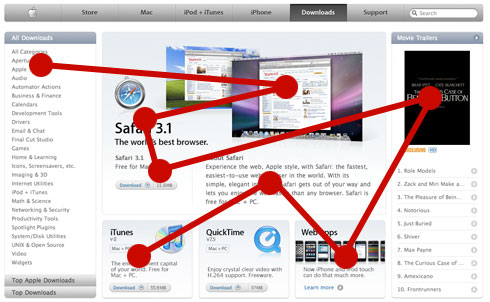
This all happens very quickly. Within a few seconds we’ve scanned the page, looking for things of interest.

The greatest problem that can happen to copy is length. It’s very easy to write too much, especially when we know what we’re talking about. It’s easy to think that by adding more information we’re making things clearer for our visitors. That may be true if they actually read it all — but they don’t. 

Your visitors are scanning madly for little pieces of information, and the majority of them don’t have the patience to read paragraphs of text — sometimes not even a sentence of text. You must provide very short and concise focus points for each bit of vital information on your page. These focus points should do two things: grab your visitors’ attention and call to action.

Let’s see a real example. Here’s the content area of the home page of MacPorts, a Mac tool that helps you install various open source software:
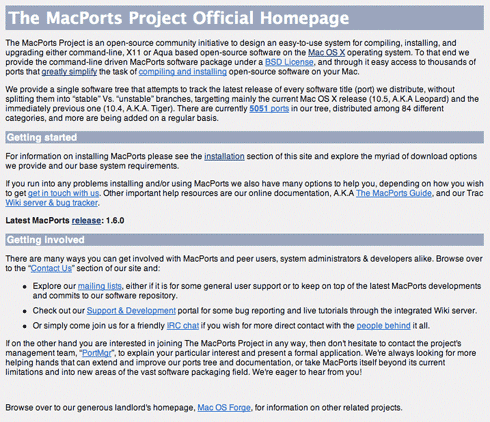
That’s a lot of text. Nobody is going to read all that — and if they do, they won’t be too happy about it. I’m guessing the majority of people who arrive at this landing page will want to actually download MacPorts, but the installation link is buried deep in the text. What’s more, about 80% of this copy can be cut without losing any information value. Here’s my quick redesign:
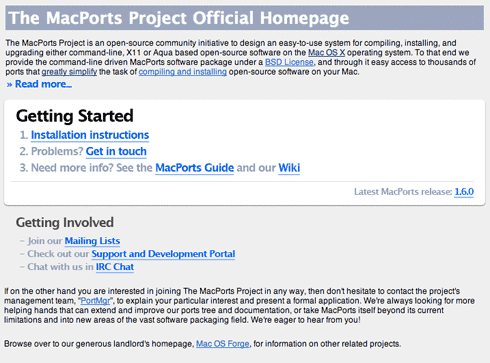
It’s not perfect, but I think it’s a big improvement. If I had more time I’d redesign it a little more, and rewrite the top and bottom sections, but the most important area has been modified — how to get started. Bullet points, concise labels, larger fonts and calls to action all help make the page scannable. People can see what links are available, and find the ones they’re looking for quickly, without having to read much text.

Usable copy must be succinct and concise. Use larger font sizes to grab attention. Give clear next action directions in as few words as possible and never dwell on the details. Most important — cut out any words and sentences that add no real value.

Be brutal. You may think the copy is short enough, but you’re the one who wrote it — you know everything it says. The visitor won’t, and to find out they’ll have to read it. But they’re not here to read — they’re here to do something, so save their time and attention by making things super easy to scan and find.

Share/Save/Bookmark

Enjoyed reading this post?
Grab the RSS feed here and get all new posts delivered straight to you.

26 Comments:

  1. Simon SC

    Thanks for another Usability Post. I’m actually working on this myself - as well as how to lead the eye in this order: header > article title > copy (post)

  2. Mark Evans

    I’ve been spending a lot of time recently looking at copy and how it fits into the UI experience. It’s amazing how each word is so important, yet copy doesn’t often get a lot of attention.

    Mark

  3. [...] blog UsabilityPost vient de publier un très bon exemple de suppression du bruit dans une page. La page ainsi modifiée gagne considérablement en clarté ce qui permet aux visiteurs [...]

  4. Jin

    I agree copy is often overlooked. That’s why it’s always important to have a good copywriter.

  5. Vance

    Labels are perhaps the most important copy in any UI, but often receive only cursory attention. All the layout and styling in the world won’t save you if your labels don’t map well to users’ mental models.

    If you haven’t already, invest some time testing labels with your target user population.

  6. Steven Clark

    The most frustrating thing is when the organisation deems any manager can write copy (argghhh!!! the bane of the CMS). The subject could also fall under “how to trash your brand - write bad copy”.

    It’s funny, for some reason everyone believes they can write, so miss the point. Writing good, succinct and easily digested copy is a developed skill that needs to be fostered. IMO, if any business is reading this - go out and hire someone for this role because it’s probably more important (if you want to achieve a successful outcome) than that shiny graphic design element everyone fussed over.

    A great deal of web copy seems akin to Korean instructions to put together a microwave oven from scratch… :)

    Another nice article Dmitry.

  7. [...] Dmitry explains the importance of writing good copy for your website in How Usable is Your Copy? [...]

  8. [...] Dmitry asks How Usable is Your Copy? [...]

  9. Nacho

    I love this blog. Keep the articles coming :D

  10. [...] Usability Post » How Usable is Your Copy? [...]

  11. Dmitry

    Thanks Nacho, I will.

    Steven: copywriters are expensive — I say, do it yourself if you have the time :)

    Having said this however, it’s all too easy to underestimate this task and not put in enough time to make it good enough. As you say, it’s not just about writing a few labels and paragraphs; copywriting is a real skill and good copy is very important if you want your site to be successful. One of the most important things actually.

    Of course, this is just the usability part of it — there is a whole marketing side to it as well.

  12. [...] How usable is your copy? Posted on October 7, 2008 by dtramontana Cool post on making your copy usable. [...]

  13. Nathan Beck

    Nice article. Copy is so completely underrated in many ways. Sometimes too much, sometimes too little and of course it’s not just about the balance between quantity and the quality, but also about how it’s positioned on a page.

    The design elements can greatly affect how copy appears, things to consider include container width, font size, font-family, line-height, paragraph spacing, paragraph size, justification, line-length, the use of bold, italics and underlining etc.

    A couple of books I think are quite good on the subject from both a usability and general design perspective:

    - The principles of beautiful web design by Jason Beaird.
    - Don’t make me think by Steve Krug
    - Web copy that sells by Maria Veloso

    Love the site Dmitry!

  14. Joe Whitley

    I whole-heartedly agree Dmitry.

    A lot of businesses tend to under estimate just how powerful good copy can be and it can really cost them dearly.

  15. Joe Whitley

    I’ve written a similar article over on my site and given you a link back to here if you’d like to have a look.

    http://whitleyjournalism.co.uk.....able-copy/

    Cheers mate

  16. Dmitry

    That’s a good post Joe, and thanks for the link back :)

  17. Joe Whitley

    No problem :)

  18. Christopher Ross

    Great article, copy is often overlooked both as a point of design and usability. Thanks for taking the time to write this.

  19. Music

    Great article

  20. How Usable is Your Copy?…

    When we talk about usability, we generally refer to the user interface (UI) — the layout of buttons, labels, tabs and so on. But there is one other element that should not be ignored as it alone can waste all the hard work you’ve put into crafting …

  21. [...] Good copywriting is part of web design. Your visitors aren’t going to read your whole page of text because usually they’re looking for something specific or something of interest to them. They do this by scanning the whole page very quickly and looking for things to focus on — so give them those focus points. Use bold text, large headlines and images to provide a scannable structure to your content. [...]

  22. David Hamill

    I agree your reworking is very good. I’d recommend ‘Letting Go of the Words’ as a good book for anyone looking to learn more about writing good web copy.

  23. [...] Good copywriting is part of web design. Your visitors aren’t going to read your whole page of text because usually they’re looking for something specific or something of interest to them. They do this by scanning the whole page very quickly and looking for things to focus on — so give them those focus points. Use bold text, large headlines and images to provide a scannable structure to your content. [...]

  24. Jumping Dog Design

    How about some cleverly crafted sub edits?

  25. [...] Good copywriting is part of web design. Your visitors aren’t going to read your whole page of text because usually they’re looking for something specific or something of interest to them. They do this by scanning the whole page very quickly and looking for things to focus on — so give them those focus points. Use bold text, large headlines and images to provide a scannable structure to your content. [...]

  26. [...] Podéis leer el post entero en How usable is your copy? [...]

Post your comment

Credits: RSS icon designed by Function.
Powered by WordPress.