17
Oct
2008
41

Categories vs Tags

Content focused sites like blogs and online magazines have various ways to organize and sort their content. Sorting articles by date and by author is usually done automatically by the content management system. There are two concepts which can be used on top of that to organize your site’s content: categories and tags. While you can use both of them at the same time, it’s probably too much bother — so which one should you use and why? Let’s examine each one in turn.

Categories

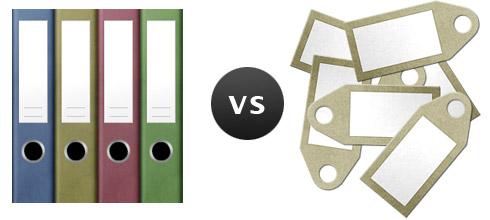
Categories are like folders — they’re collections of things related to one theme or topic. This actually isn’t strictly true because in the digital world you can attach more than one category to your content, but the function is the same — to categorize.

The main advantage of categories is that there is a set amount of them — and if you want to utilize them properly then there shouldn’t be too many either. This lets people scan through the list quickly to choose the topic they wish to browse. Categories give your content structure and an easy browsing experience.

The downside of categories falls on the publisher. Firstly, you have to decide on the list of categories you want to use. This is usually harder than it sounds because you need to make sure there aren’t any categories which would have too many or too few posts in them. There is no point making a category if all your posts are included in it or if there is just one post. And secondly, whenever publishing new content, you need to decide which category to put it in. This isn’t too hard if you keep your category list short and assign multiple categories to content, but it still requires a little effort.

Tags

Tags are the digital equivalent of real tags — little labels you attach to things. Tags have an advantage over categories in that they aren’t pre-set. When you attach tags you write them in manually and have the freedom to write whatever you want. If a tag doesn’t exist already, it will once you’ve hit publish. There is no need to worry about finding an existing category to fit the post into — you just write the labels you feel best represent the content.

The downside of tags is in the browsing experience. One of the most popular ways to browse by tags is using something called a “tag cloud”. A tag cloud is a big block of tags listed one after another, with each tag link having its own size depending on how many items are tagged with it.

Tag clouds are great for showing what sort of entries are posted the most on the site, but browsing by tags is difficult because there are usually just too many of them. The other problem is that they’re unbalanced — there may be only entry attached to a particular tag, or there may be thousands.

OK… so which one do I use?

The answer is… it depends. It depends on what type of content you have and how your search works.

If you’ve got a site like YouTube or Flickr where users submit their own content and you have thousands or millions of submissions then categories won’t be as useful as tags because there may be thousands of entries to each category. This makes browsing very difficult and in most cases impossible. Each tag may also contain thousands of entries, but there will be many more tags with a much more focused yield of results; and using combinations of tags will also greatly narrow the number of results your visitors have to browse through.

If your site-wide search uses tags when looking through records then tags can and will add a clear benefit. If your search is something very simple, like an external Google search which simply filters results by your site address, then tags may not be as useful because they won’t be used to find the results.

I don’t think that for blogs tagging makes much sense. Sure, it may be easier to tag things, but the browsing experience isn’t that great. Sometimes you will have just one post attached to a tag — what use is that? People will generally want to find posts on a particular theme, and that’s the primary function of categories. What’s more, you’re not limited to using just one category — attach a couple if you feel the post is relevant to both. 

This is just my take on tags and categories, I’m sure some of you may disagree. I’m very interested to hear whether you use tags or categories on your blogs (or both?) and why do you prefer one over the other — please do post your thoughts in the comments below.

Share/Save/Bookmark

Enjoyed reading this post?
Grab the RSS feed here and get all new posts delivered straight to you.

41 Comments:

  1. Jin

    Tags for a blog site is also good for automated content such as “related articles.” This way, you don’t have to manually type it up. It can be done with categories too, however not as accurate since two articles on the same topic may have totally different word choice in the title.

    Personally, I only use Categories. Even then, sometimes I can’t decide which category to use. Due to the style of my writings, a lot of articles apply to several categories. I can put an article in multiple categories, but I feel like it’d clutter up the archive page with duplicates.

    I haven’t found the right solution to this problem, therefore I don’t even display categories at all.

  2. tontechniker

    In my current project I mix tags and categories up - if you add content, you add multiple tags, so you get a good short description of the content. The user who comes to the sites don’t see the tags - they are displayed as categories (=onl popular tags) and used for a related content algorithm, which is much more precise with tags.

  3. Dmitry

    Good point Jin — can definitely see how that is useful.

    tontechniker: So if I understand correctly, you first choose a category to post in, and then add tags for your content? That’s interesting — is that user generated content?

  4. Mokokoma Mokhonoana

    Interesting post, I think ‘tags’ are a must for user generated uploads.

    But for a blog that concentrates only on certain subject(s) categorizing works best…

  5. Jin

    I forgot to mention that for a huge resource site with mostly user generated content, tags are essential for search result optimization.

    A former coworker of mine wrote on this very subject today: Search Within Tags

  6. Christopher Ross

    I use both category and tags on my blog, I find categories are best for my initial sorting and placing material in special ‘zones’ that I’ve programmed but I think tags are better for the users to be able to shift around and find similar content on their own. Two very different objectives, luckily WP gives us the options of both.

  7. Paul Smith

    Personally I don’t think the word “tags” is good. Gmail got it right with “labels”. It makes more sense right off the bat. When I very first read “tag this article/photo/whatever” I had no idea what they meant. I kept thinking of the game tag and somehow it related to “tagging” something. Maybe that’s just me, but label makes way more sense to me.

  8. Dmitry

    That’s quite interesting Paul. Google must have had a reason to go with ‘label’ instead of the usual ‘tag’, so it’s probably not just you :) Good observation.

  9. Janko

    Maybe it would be the best to think about categories + tags and not categories vs tags.

    Each article could be labeled/categorized/tagged in two dimensions. One dimension (categories) would be something semantic like: tutorials, freebies, revisions… This way you can store each article to only one category.

    And the other one (tags) would be something more descriptive like: photoshop, illustrator,ajax and so on.

    Just a thought.

  10. Markus

    With saying having just one post attached to a tag in your blog doesn’t make sense I think you miss the big picture. Sure, for your blog it doesn’t make too much sense. However, usually user read about a special topic across blogs. There may be articles with the same tag on other blogs and then it definitely makes sense having a tag on an article you might not use anywhere else on your site. Another plus is that tags give some semantically relevant meaning to your articles. This enables search engines to better understand what your article is about.

    What do you think?

  11. Sugarenia

    I say categories all the way in my blog. I’m quite focused in my content, so the idea of using tags for my posts puts me off.

    Yes, tags are useful for user-generated content, but we must be careful with execution: remember that one user will tag “believe” and the other “belive”.

    Plus, I agree that “labels” is a much more effective way to describe them. “Tag” is just another buzzword.

  12. Tibor

    Drupal (an OpenSource CMS) uses “vocabulairies” (categories) with terms (tags/labels) inside of them and offers a way to add relationships between those, which makes offering ‘related content’ much nore flexible. Kind of the best of both worlds.

    Also you can define synonyms for tags to tackle misspellings etc. Very usefull in a situation where users can define their own tags.

  13. Jan

    nice post and good comments.

  14. Ido Schacham

    This post left me somewhat confused. What about the case where the user is the one who generates the categories?

    More specifically - we’re having some discussions here at Testuff whether we should move our test management to a tag based system rather than a hierarchy (isn’t that what categories and folders are about? the hierarchy?). I’m afraid that this post didn’t help me get any insights on the matter.

    Another thought, are users actually using tags? For me, as a user, tags seem to cumbersome - too many, too messy and I barely use them unless I have too. When I see a way to navigate via either categories or tags, I go with the categories. So are tags actually usable, or are they just the latest hype? Can you give some examples of sites or software that utilize tags successfully?

    Comments and questions aside, I love your blog, keep it up!

  15. dave

    Mixing tags, categories, and other options is important to offer the best navigation experience, i think

  16. Nollind Whachell

    It seems a lot of people confuse categories with tags, almost thinking they are one in the same, when in fact they each serve different purposes. Think of a category as a way of “locally” organizing content in a very “specific” way, so they are meaningful to you personally. Tags on the other hand are a way of “globally” organizing content in a “general” way, so they are meaningful to many people across the Web.

    So if I setup categories in my blog, they might be “Web Design”, “Business Culture”, and so on. Thus they tend to be specific “topics” about things of interest to me and, more importantly, they could almost be their own blogs in themselves (since they are a focused topic). Now when I post a blog entry in my Web Design category and I’m talking about designing forms with CSS, the tags I’d probably apply to that entry would be “design”, “forms”, “css”, and so on. As for how these are both displayed, I’d probably add the category on the entry byline (i.e. Posted by Nollind in Web Design) and the listing of tags at the bottom of the entry (i.e. tags: design, forms, css).

    Again they both serve different purposes in their own way. Categories help me organize and find my thoughts and interests on a personal site level and tags help people find my content globally across the Web among many different sites (i.e. Technorati).

    Finally my personal preference is that I prefer just using categories, since tags can easily be grabbed from your content itself. So if I said the word “computers” in an entry, Technorati has a pretty easy time finding that keyword without me even needing to add a tag called “computers”. Thus I often may think of keyword tags that relate to post I just completed and if my entry doesn’t include them in the body of text, I’ll figure out way to interject them so that they can be found via sites like Technorati. So in effect, instead of adding tags afterwords outside of the entry, I try to ensure the tags are in my entry content itself.

  17. Dmitry

    Ido: My impression is that categories are easier to use than tags to browse content — i.e. you’re a visitor to a blog, how do you want to browse its content, using a tag cloud or a list of categories? Usually there are far less categories than tags in the cloud, which is why I think it’s easier.

    Tags are useful when browsing sites with a lot of user submitted content because categories would be useless there since each category will have thousands of entries. I find that Apple’s iPhone App Store has this problem now. You can only browse by categories and there are now just too many apps in each category to easily check them all.

    Markus: Would search engines use your tags though? I’m not sure they do — I may be dead wrong though :)

    Nollind: I definitely agree that they both serve different purposes and the ideal would be to use both together. The issue is whether you as the publisher want to go through the effort of assigning both categories and tags to your posts :) Some blogs that post a lot of content daily don’t even bother categorizing posts.

  18. Steven Clark

    I’m a categories person on the blog and don’t use tags there. They have their purpose but I’ve always seen tag clouds as a little unusable, out of balance and visual noise.

    When someone goes to a blog they’re generally comfortable with categories. When you think about a blog visitor you would have people more interested in a category like design, for example, or CSS. Less common would be the “surfer” that wants to sit for half an hour exploring. Just my humble opinion. Because people are essentially time poor, even our blog readers.

    So tags can be a little of a thinking barrier to users. They have to do some discerning about what tags mean - the believe belive example and one man’s moon is another woman’s space.

    Tags for user generated content sites definately. Categories for blogs. I agree.

  19. Steven Clark

    On tag clouds, the most tags in one I’ve ever clicked is 2 tags. The biggest ones. So IMO the rest of the tag cloud is noise and the smaller they get in the cloud the harder to click (less accessible and usable to users). I’d expect that any stats would show this would be a similar experience for nearly everyone on tag clouds - click the biggest one and probably leave. It’s more like mystery navigation when done in an ad-hoc way on a blog.

    But that’s just my 2 cents. I may be an old stick in the mud Dmitry.

  20. [...] Categories seem to be more appropriate to blogs and tags seem more appropriate to sites with user generated content - Categories versus Tags. [...]

  21. Brandon Cox

    So far, on almost every project I’ve ever designed for, I’ve been able to find a need for both, but I’ve never been able to use tags without categories altogether.

  22. Gio

    I start blogging with categories (at that time there are only these) but now i use both categories and tags: few category (many time only one) and a couple of tags

  23. [...] cosa che in inglese non può succedere. Consiglio pertanto vivamente la lettura dell’articolo Categories vs Tags per venirne ad una (ma anche del vecchio articolo pubblicato in proposito, vedi link in [...]

  24. [...] Fadeyev na Usability Post pisze o rozróżnieniu pomiędzy kategoriami i tagami, wychodząc od (pozornej?) oczywistości: znaczenia obu terminów. Kategorie, pisze Dmitry, są [...]

  25. [...] Categories vs Tags [...]

  26. [...] Bookmarked a link on Delicious. Categories vs Tags [...]

  27. Dmitry

    Steven: I agree. Personally I find tag clouds fairly difficult to use because a lot of the time there’s just too much stuff there.

  28. [...] en la disertación propuesta Dmitry en Usabiliy post, empecé a hacer una pequeña reflexión sobre cuándo se debe construir un arquitectura de la [...]

  29. Jason

    Who started using tags? To my very limited memory, I think the first time I saw tags was on Flickr; and I do feel using tags (labels) is a great way organizing photos or videos. Categories cannot catch a lot of detail in the photos or videos.

    But for text based contents, yeah, keyword search might have covered tags. Not likely I will use tags that don’t even appear in an article I write.

  30. Gustavo

    I agree with Steve, BUT…
    with clouds we can see what the others people around the world are looking for!

    I don’t click in small tags, just on the highers too… but it’s cool see what is most search!

    Other day i just see that WCF was a big tag and i curious look around what’s mean! Windows Communication Foundation

    In that point is really cool!

    Sry for my bad english arghhh!!!!

  31. Julia Valencia

    I am developing a tag system and this information is very useful. I have to study location for tags on my page. I think tags are very useful to browse web pages.

  32. Chip Zempel

    I’m setting up my first blog and just came across this page after using Google to try to help me clarify the difference between tags and categories. Thanks to everyone for some very helpful discussion!

    After reading the comments here, I have come away with the impression that Categories can be thought of as being analogous to the Table of Contents in a book, while Tags are like the Index. Different ways of organizing and accessing the same content, one more structural, the other more “random access.” At least, that’s the way I’m planning on setting up my blog.

    Thanks again to all the posters!

  33. [...] you ask since I’ve recently come across a post aimed at explaining categories and tags. Tags are just another way to describe your content. They become another way to search for your [...]

  34. [...] Categories vs Tags [...]

  35. HBR

    Let’s say you write a funny critic about GW Bush and want to make it easily accessible in a given aggregator.

    You place it in the “Stupid :)” category and you then give it 3 tags/labels : “monkey, bush, war”.

    So you first give a general theme to a content and then go more specific by adding labels/tags/stickers to it in order to easily recognize what it is dealing with.

    In some other websites you’d find categories and subcategories, but I still find this a limited solution for multi-style or multi-subject content.

    As far as I am concerned, I don’t recall any time I used the tag cloud to search for something. If for eg. I am serching for some content about UFO, the first thing I’d do would be looking for a category named “Paranormal”, once found, I’d refine my search by typing in “UFO arizona”. If I don’t find any categories, I’d directly use the search engine.

    So my method -like many other users above- to classify content is to affect it to a general idea/theme/category, and then assign as many tags as needed to make the identification of the content easy and fast.

    voilà ;)

  36. Mark Bowen

    I use both on sites. All depends on what the site is really. I may even have certain sections that only use categories and others that use tags or sometimes even a mix of both.

    All depends on the content and how I want to make that content available to people however I never ever let users submit tags. I have tight control over the tags myself.

    One thing I found a little confusing was on this site. I see a tag icon at the top of each post and I noticed it on one of your other posts where it had Html-CSS after it. Seeing this I thought it was two tags where in fact it was one word and clicking on it takes me to a category page!

    Seemed a bit weird having a tag icon image that leads to a category page.

    Could just be me though? ;-)

    Best wishes,

    Mark

  37. Michel

    Tags for blogpost might not add to the user experience but it can create another feature you might like: related post.
    Maybe bloggers should add tags, without showing it to their users…

  38. otomatik kapı

    thnks

  39. ofis mobilyalari

    thnks

  40. göğüs büyütücü

    thanks for sharing..

  41. [...] So there you go - categories organize, tags identify.  Ultimately, their basic function and usage might change depending on what you’re using them in (a blog, Flickr, a CMS, etc…), but that basic principle will generally always stay the same no matter where you are.  When users question their function, try to give them a simple example to go off of.  If they don’t get it in our CMS at first, I tend to find refering to Flickr and YouTube to be nice examples that everyone seems to get.  For more information on the discussion, I recommend the Categories vs. Tags articles at Haacked, or Usability Post. [...]

Post your comment

Credits: RSS icon designed by Function.
Powered by WordPress.