The iPhone App Store Buy Button — Foolish or Brilliant?
One interesting part of the iPhone App Store user interface (UI) (the one on the phone itself, not through iTunes) is the buy button. The button is the price tag. It looks like this:
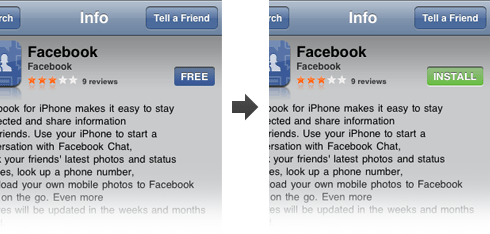
On the left is the buy button you see when you load the application page. In this case the price tag on the button is “free”. On the right you can see what happens when you click on that button — it morphs into an “install” button. You then have to push (tap?) that again for the installation process to begin.
I can’t decide whether this is brilliant or silly. On one hand, it serves its purpose very well by not only saving space, but by also making sure the user knows exactly how much they’re going to spend on this app. They’re not going to miss the price tag because that’s what they need to press to buy the app.
On the other hand — is it intuitive? Perhaps a better word to use is familiar — is this UI element familiar? It’s not. At least I haven’t seen this utilized anywhere else. I haven’t had a problem with this button because I’ve actually seen videos of the App Store in use before its release, so I knew exactly what to do when I got it. I’m not so sure how quickly I’d figure it out had I not seen the videos.
What do you think? Is this a good way to do the buy button in this context?
You strike again… why?… :)
I was in the mid of drafting a blog on Familiarity vs. Learnability…
Well, I’ve given this topic quite some thoughts lately. We’re used to products that have familiar UI from what we’re used to. However, if everything’s familiar, then how will new, innovative UIs ever be created if everyone plays safe?
That’s where learnability comes in. In your example, Apple has the brand advantage, where most people automatically assume if it’s from Apple, then it’s good stuff. Some fandom is involved here. In the case of the Install button, I’d not know the install button is clickable to initiate the next step first time I use it. However, the learnability is quite low in this case. So I think it’s ok.
There’s always the “training issue” whenever we create new web apps. It’s a fine balance between how much we want to push new UI, vs what users are already comfortable with imo.
I think it’s a smart move. It makes it hard to “accidentally” buy an app, and it’s fairly apparent how it works.
Sure, it’s not a common interface method, but isn’t that how interface innovation happens? Someone does something different that may potentially work, and eventually be adopted by others?
Do post your article Jin — this isn’t really much about familiarity as it was me highlighting a unique UI element :)
I do think however that you can make innovative UI that’s also familiar. I think that’s what separates great designers from the rest; they’re able to find appropriate metaphors to symbolize new functions of an application or a hardware device.
These buttons did strike me as awkward the first time, but I hadn’t thought about them since.
Most of my annoyance in this process comes from having to repeatedly enter my itunes password to download free apps. Billing statements itemizing my free purchases are a little over the top too.
If you look at the button itself, it reflects the same appearance as the “search” and “tell a friend” buttons. This gives the message that there is an action connected to the price. In most shopping carts, an action button for a price on a detail page is the “buy” button. Click it once to show intent. Click it a second time to confirm. How could someone honestly complain they accidently bought something?
Learning curve is almost instant and works well with the process of how you learned to use your iphone to get you to that page in the first place.
I would lean towards the brilliant side.
Brilliant.
Saves space and prevent accidental purchases.
I think “buy” is intuitive, but “free” is less so.
I was thinking they could bypass “free”, and on free apps just have “install”. The downside is that one may think they have already “bought” (accidentally maybe?) the app when in fact, it is free.
I think it’s brilliant, pending a debate whether “free” is actually necessary.
I don’t own an iPhone or iPod Touch so I haven’t “experienced” the button yet, though I think there should be some kind of label under/above it like “press to install”
Though that might be a bad idea too, because then you gotta press again to actually install…
Actually, you can´t install the software if you don’t buy it. So I think the problem is not shifting price to installation.
The problem lies on the issue that the price is the button to buy the product.
It doesn’t annoy me. It’ clear and concise. What bothers me in the “update” functionality. there is absolutely no way to update all apps in one go on the phone. You need to install them one after one and every time you leave the install window. For me the poorest implementation on the ihone
Hendrik: So true. I think it may be a hardware limitation — the phone can’t handle that many multiple processes so the best they could do is just queue the installations, which is essentially what you have now, you just have to do it manually.
It looks like a button, and it’s in a good, clearly visible, location. I think it took me about a second to work out its function, and would probably be the same for most people. I have no doubt it was thoroughly tested by Apple before launch.
I would say that space in this case, was not THAT critical. They could drop that button a line (without it taking a lot more space) and put the text as:
“Install for Free” or
“Install for $1.99″
That way is clear the price and what it does.
I don’t have a problem with the button, but rather the fact that you have to enter your iTunes password in a box every time once you’ve pressed it, even if you’re installing a free app or update. Wish I’d chosen a shorter password!
I don’t have an iPhone (*sob*) so haven’t used or even seen this ’til now. I can imagine it having usability problems though, the over zealous tapper hitting install by accident. I reckon a better option would be loading the install button under the “Free” button, once the “Free” button has been pressed. This way it conserves space until it’s loaded, and loads a critical button in a different hit area, lessening the chance of accidental purchase.
The button works well and is very usable. I got an iphone recently and without watching the video i instinctively knew what to do. The shading/bevel on the graphic along with the contrasting colour ensures we know its a button & as its the only clear button on the page its obvious that this is where you click. Because you need to click twice to buy safeguards the possibility of error purchases while the second green coloured Install/Buy Now indicated that an action is about to occur. Well done Apple again!
I’d say it is foolish. While it certainly does great with the power users (who generally have better suited intuitiveness for web 2.0), this seemed to fail on all non-power users I tried this.
Diego’s example above is much better.
Personally, I think it’s foolish. There have been a couple of times that I got lost on an otherwise simple design because of it.
Then again, the whole iTunes store seems to defy common sense. I have $25 in cash on the store yet I can’t buy applications with it. They make me use my credit card to purchase apps. Now, I can buy movies or songs with the money … but not applications.
That makes no sense.
I don’t have an iPhone, but wouldn’t it make more sense to just start installation as soon as they hit the “buy” button? This is completely out of ignorance, but is there a time where you’d want to buy an app, but not install it right away?
[...] a great write up on the iTunes Buy Button that I really enjoyed this morning. Usability is under rated, great usability is [...]
Ben: I think they did the second click as a form of confirmation. So even if you hit the button accidently, you still need to hit install to proceed. And actually after that you need to fill in your password as well (which is a pain if you use a strong one :)
I haven’t seen videos of App Store in action before using it, but I thought that price tag is the buy button. Somewhat silly and somewhat brilliant. But in most cases I think it’s self explanatory.
I never even thought about it until seeing this post. I’ve used this feature mindlessly. The usability of it never even crossed my mind…which is probably a great compliment to the design. But, now that you bring it up, it appears that the overarching theme of the iPhone is making best possible use of space. I think we’d all agree that there is no such thing as all or none when designing UI. We always face the need to sacrifice one thing for another.
When I first encountered this button, I was a little taken back because I didn’t really know it was a button but, rather, I assumed it was a label. However, once I realized there was no other way to acquire the software I was trying to obtain, I knew exactly what it’s functionality was and from there on out, I rather liked this button’s multi-purpose functionality.
Didn’t get to read most of the comments, but I would have to say:
My issue is the graphic itself. It already looks like somebody pressed/pushed it in. Surely until you’ve clicked it (a:active), it should say “up”, right?
Andrei: I agree, it does look receded — though it looks even more receded when you push it :)
I feel this design is useable and learnable, if you look closely, the button is slightly inset but so are the blue button bar buttons, as stated above. This small design cue tells the user that this is a button and can be clicked. Instinctively, I knew to press this button to purchase/install an app without any outside instruction.
Functionally, the two button press is solely to prevent unintentional purchases. The iTunes Store, it seems, does not employ this function. The buttons in the iTS indicate (to me) a 1-click buy design, so I am very hesitant to click on the price button in fear of purchasing a song I am not sure that I want. The App Store uses its current 2 click function to safeguard accidental purchases.
Overall, I feel this design is good as it serves its purpose with unnecessary instruction while maximizing use of space. Changing the text to “Install for Free” or “Install for $1.99″, as Diego stated is a debate over semantics, the concept is clear without the additional text.
It’s a great “saftey net” if we didn’t have to also type in the pesky password each time as someone before mentioned. With both the double press and the password, there are 3 steps needed to buy & install the app.
And the depression of the button after pushing the price threw me off the first couple times because it wasn’t a common behavior to press the same button twice to perform an action (except on a mouse). :) And you can’t quickly double press, which is annoying too.
Changing the text to “Install for Free” or “Install for $1.99″, as Diego originally stated is not a debate over semantics — it misses the key point of what is so freaking wonderful about the design: the built-in confirmation. It’s beautiful UI work.
(… and totally undermined by having to put in your password anyway.)
It was not familiar the first time I used it, but it has been ever since. As Jin said, it is very learnable so that once you ‘figure it out’ it immediately becomes familiar. It’s like a good song, you can hum it once you hear it.
Definitely Brilliant :-)
I think this is a stupid and foolish implementation of a decent idea.
The first time I used this app, after the first tap on the FREE button, I had absolutely no clue that I had to tap again. The button had changed state into something else, and seemed to have tagged the app for install. Instead of a button, it now looked like a status display. After a few seconds of this, I did tap it again, but the button actually changed back into the FREE mode. I kept tapping the button, and it just toggled from FREE TO INSTALL and back again, so I assumed I would have to put the iPhone back into the cradle for it to actually install. This happened several times with apps until, in my 2nd month of owning the iPhone, it actually prompted me for a password and began intalling. When that happened, I groaned inwardly that their UI idea had fallen on its face due to poor implementation. The trick seems to be, you have to let it sit for several seconds on the INSTALL mode before you can hit it again. Otherwise it just turns back into FREE. How does that make any damned sense?!
Now, I wonder how many of you approached this particular UI element from a real fresh novice’s perspective. As a PC user since DOS who has only racked up maybe 2 hours on Apple machines in the past few years, I can safely consider myself an Apple novice. Perhaps like many of you, I actually studied UI and related HCI fields. Yet I completely did not understand this UI choice and certainly the stupid implementation of letting the button toggle between FREE and INSTALL didn’t help.
A couple suggestions: The button should not toggle back, regardless if their interface is ready for it or not.
Second, they really should make buttons look like buttons that stick out (the highlight on the button should be at the top, indicating that it sticks out upward out of the screen, rather than at the bottom edge, where it looks recessed).
Anyway, this and other quirks have made me a complete skeptic as to the supposed awesome power of the Apple UI design team…
Assuming I’m reading Raskin correctly, his point is that intuitive is at best a poor benchmark for innovation and at worst hampers innovation.
As such, we shouldn’t ask “Is it intuitive (aka familiar)?” when we’re trying to innovate.
It’s more important is to ask, “Is it intuitable?”
That leaves the door open for innovation in a way that (a) doesn’t bind us to the familiar and (b) respects the users goal of being able to figure it out.
Aside: There’s a nice subtext about client service to Raskin’s paper which I think is worth noting. It doesn’t matter how good your idea is if you can’t sell it (or build it yourself).
Pete comments…
> Learning curve is almost instant
Exactly! It’s not familiar. But is IS intuitable. And thus I too lean towards brilliant.
Only thing I don’t like about it is that it’s a bit fickle, and sometimes that 2nd click fails to register for me.
Either way, nice comment thread.
TL
P.S. Off to go play some Trism.
I got my phone 5 days ago and today I accidentally bought a PianoApp as I was installing similar FREE Apps to compare them for purchasing one later on. I tapped FREE - INSTALL so many times I got used to double tapping and got owned. Is there any way to cancel, roll back, refund, etc ?
I made the usual mistakes listed above, got it right and never thought about it again.
My problem with the apps store is it doesn’t indicate which apps you have already got/tried. There are a couple of apps with videos that won’t import to my iphone, so I deleted them. Then weeks later I try to reinstall them, forgetting they’re the ones that don’t work…