CSS Tip: Improve the Look of Your Headlines Using Letter-Spacing
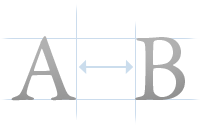
There is a term used in typography called kerning. Kerning refers to the adjustment of space between letters. Fonts are generally fairly well calibrated by default, but at larger sizes you can begin to see imbalances in spacing between letters.
Kerning is used a lot in the print industry, especially for headlines and logotypes; but it’s something that’s not widely used on the Web because of the lack of control we have over fonts.
But we do have some control. There is a CSS property called letter-spacing which can be used to manage just that — the amount of space between letters. This isn’t true kerning since we cannot tweak individual letters, but it’s better than nothing. For large fonts used in headlines letter-spacing can come in very handy because at larger sizes the gaps between letters are sometimes a little too big.
Let me show you an example. Here’s a sentence written in Arial size 28 pixels font:

Looks pretty good, but I think we can tighten that font a tiny bit. Here’s the same sentence but with a letter-spacing property of -1 pixel applied to it:
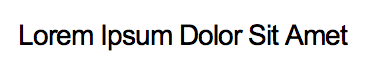
I think that looks nicer, especially for headlines. Here’s the CSS code used to achieve this:
#headline {
font-family: Arial;
font-size: 28px;
letter-spacing: -1px;
}
Letter-spacing is something that in my opinion should be utilized more on the Web. If you haven’t tried it out already, give it a go — your headlines will thank you for it.
30 Oct, 2008
Excellent post. Don’t forget that there is also Word Spacing.
“word-spacing: 1px;”
30 Oct, 2008
You can also specify this in ems, which means it scales with changes in font-size.
30 Oct, 2008
Anthony: I didn’t even know about that one, thanks for mentioning it — will have to try it out :)
Scott: That’s even better! Thanks for the tip.
30 Oct, 2008
A bit of a trend these days is big, sans-serif type (often Helvetica) with -1 letter spacing.
30 Oct, 2008
What you are referring to as ‘Kerning’ is actually Tracking.
Kerning is adjusting the spacing between two individual characters.
30 Oct, 2008
Hilowitz: I did mean kerning — I realize letter spacing is different and I did point that out above :)
30 Oct, 2008
I haven’t done extensive test on this, how does this affect printing? I’ve noticed some oddities when i used word-spacing or letter-spacing. things look fine on the screen, but prints out odd on paper. e.g. word spacing etc. I was using FF at the time.
30 Oct, 2008
That’s another brilliant post, Dmitry. Well done.
30 Oct, 2008
Great tips, I applied this method at my website for the headers.
Here is also a post with header inspiration, you can see various examples of the tight letter spacing.
30 Oct, 2008
Yep. I’m starting to use it more and more. I think Arial + strong + negative letter-spacing kicks ass.
30 Oct, 2008
I do think you should read more about typography. Your example shows a biggest mistake made by amateur designers. Spacing between bigger one font letters should be bigger than the same font with smaller letters.
You do totally different and I hope there will be much less readers for this post so we do not have new “designer trend” in web-world.
31 Oct, 2008
I actually fail to see why the second title looks better; I feel the opposite. The second title is harder to read because the whole thing looks like one word to me.
31 Oct, 2008
I’m a little surprised no one’s mentioned the famous line by Frank Goudy, “A man who would letterspace lower case would steal sheep.”
There’s a small page on “The Elements of Typographic Style Applied to the Web” (http://www.webtypography.net/Rhythm_and_Proportion/Horizontal_Motion/2.1.7/) that talks about not letterspcing lower case without a reason. While I agree with this, your post here mentions one of the good reasons for trying out letterspacing: headlines.
If used in moderation, adjusted letterspacing can look quite nice in headlines (just look at Coudal.com). Increased spacing doesn’t usually look so great but subtle negative spacing can be a nice touch. However, I think it’s fair to say that letter spacing should hardly ever be used on body type.
31 Oct, 2008
Mr.SergE: Thank you for your comment but I must disagree. Do you consider Coudal or Happy Cog to be amateurs? They both use negative letter-spacing in their work :) If they’re amateurs, then I really don’t know who the pros are.
Jason: I guess it comes down to taste — sometimes you may want to add positive letter-spacing to space it out a little. As Nick pointed out though, this must be used in moderation, which is why I’ve used only a tiny 1 pixel to shift it, and it already made a difference.
Negative letter-spacing is effective on headlines because headlines are not the same thing as body text. Sometimes they look better when tightened as you get a clearer line of words, rather than just a larger font. Font designers don’t expect your body type to be 28 pixels or more, so the default spacing can be tweaked.
P.S. Mr.SergE: Your own blog theme uses negative letter-spacing ;)
31 Oct, 2008
Jin: Very good question! I haven’t done a lot of tests on this either so not really sure what may be causing it — will have to have a look into it.
31 Oct, 2008
Actually, Hilowitz is completely correct. Kerning doesn’t enter here at all. Though you clarify, it’s not even fake kerning. It is tracking. The two are completely separate and kerning doesn’t feature here at all.
That said, I do agree that for headings letter-spacing is a nice touch, especially for readability *but* I also agree with Mr.SergE and Jason - I prefer increased letter-spacing. Maybe it’s personal preference, but tightening the tracking IMO reduces readability.
31 Oct, 2008
Harry: I never said it’s fake kerning :) I said there isn’t any way to kern letters with CSS, but there is a way to manage letter spacing. I didn’t feel like introducing another typography term in there. I guess I wasn’t very clear, my apologies.
I agree that it may indeed decrease legibility — but headings aren’t very long and the effects aren’t very severe so I would say improving the looks provides more value in this context. As Nick said, I wouldn’t change letter spacing in the body text.
31 Oct, 2008
[...] Usability Post: CSS Tip: Improve the Look of Your Headlines Using Letter-Spacing [...]
31 Oct, 2008
Dmitry: I know, but you said it isn’t ‘true kerning’ so I made a point of saying that it’s that far from kerning that it’s not even fake. I think it’s fair to say that it wasn’t a case of anyone being wrong, rather people using different terms.
And yes, it’s unlikely to be too detrimental on headings, but definitely shouldn’t be used in body copy.
31 Oct, 2008
One of the best tips I’ve seen in a while! Yet, so simple. Thanks :)
31 Oct, 2008
I always use positive letter spacing on header text. Don’t know why I like it better.
31 Oct, 2008
Another vote for +1 letter spacing.
It’s personal preference but the effect I find it has is that it will open up a design, things will feel lighter and airy. Like it gives headers room to breathe.
I employed it on an older design whilst it’s not perfect has has it’s faults. You can’t deny that the increased tracking reflects the cloud, air and sky motifs.
http://www.grantmeahigherlove.com/
1 Nov, 2008
Nice, I just tried it and it does make arial more interesting
2 Nov, 2008
I think the headline with the original letter-spacing is much better than the modified one. Especially in terms of readability the second example is imho quite bad.
2 Nov, 2008
[...] Usability Post » CSS Tip: Improve the Look of Your Headlines Using Letter-Spacing (tags: css typography webdesign programming) [...]
3 Nov, 2008
Whether or not adjusting the tracking “improves the look” of headlines is a matter of personal preference, and one’s susceptibility to a current trend to set headings big and tight.
7 Nov, 2008
As long as I can read, on top of that page is written “Usability post”. Legibility is very important for usability. But I see some are talking about “taste” and “looks pretty good”, but wait a second, that is the author of this article on usability that is saying these. He even says: “I agree that it may indeed decrease legibility”. So it is OK to neglect legibility, isn’t it Dmitry?
The problem is not that you don’t care about legibility. The problem is not in the 1px negative tracking, used here and there, it’s OK. The problem is that some young fellas come here to read about “usability” and they are told that legibility is not a matter of concern, that the designer’s taste is more important than users’ convenience.
You ain’t Carson, right? And web is not a place for expressionistic typesetting.
7 Nov, 2008
Oh yeah, pulling in the letter spacing on big bold Helvetica is a must if you ask me. Everybody is doing it. =)
7 Nov, 2008
Kerning is a must when providing content on the web. To be able to use letter spacing in your content is a must as a designer. I agree with Coyier that you have to include letter spacing when using web fonts. You would do the same thing if you were going to be embedding the fonts in an image right?
8 Nov, 2008
krustev: Thanks for your comment. You have to remember that usability is about how “usable” something is and being attractive and aesthetically pleasing is part of it. Usability is making things easy and enjoyable to use. Good design is all about being able to fuse function and form into harmony — it’s not all about function.
10 Nov, 2008
[...] http://www.usabilitypost.com/2.....ter-spac... [...]
13 Nov, 2008
I think letter-spacing is a great idea, but your example makes a decent headline worse.
You’ve crammed all of the letters together, which makes it feel uncomfortable and more difficult to read.
17 Nov, 2008
Arial, strong, letter spacing -1px kick ass Period.
26 Nov, 2008
Anyone with even the smallest amount of graphic design understanding, knows that headlines should be kerned/tracked tighter, i.e. -1, as the Blog’s author contends. +1 on a headline? No way!