14
Nov
2008
19
The Pitfall of Adding Keyboard Shortcuts to Web Apps
I’ve recently discovered a few keyboard shortcuts in Google Docs, Google’s office suite of applications. But unfortunately, I’ve stumbled onto them by accident while using a shortcut on my OS X operating system. When I tried to hide the browser window using the “Command + H” key combination, something unexpected happened. The “Find and Replace” window popped up inside the app:
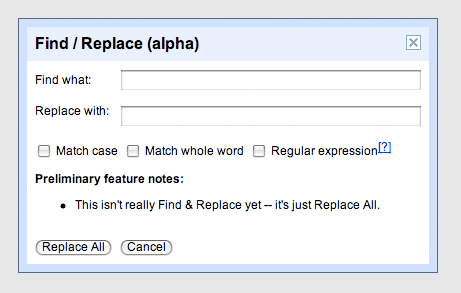
This is problematic because I still want to use my OS X command, but now it’s been overridden by Google. I think web application developers should be careful to check for at least the main window manipulation controls in the popular operating systems like Windows and OS X to make sure their keyboard shortcuts don’t block them.
14 Nov, 2008
[...] Post just wrote up a small article on overwriting system level key bindings in web-apps, and how, obviously, it’s a bad idea. [...]
14 Nov, 2008
Webapps nowadays can substitute a lot of desktop apps, where keyboard shortcuts are always implemented. So avoiding them in a webapp means make the user experience worse from the very beginning :-)
We’ve tried to solve this problem in our online outliner, http://checkvist.com. The goal was to save user’s habits of creating outlines (Enter, Tab, Shift-Tab, arrows for navigating the list, etc.)
14 Nov, 2008
This is exactly why accesskeys are considered bad practice on websites now. I believe that between all browsers / OS combinations there about only about 2 safe keys to over-ride (can’t name them though). Because whenever you declare an accesskey you’re over-riding the key’s functionality on their computer.
So it confuses people. Even worse with accesskeys if there is, as happens, different accesskeys set for different websites.
So any over-riding of the default behaviours need to be done cautiously. Very valid post Dmitry. The worst usability experience is a total surprise that takes over your default / habitual key behaviour.
14 Nov, 2008
Overridden shouldn’t be a word.
14 Nov, 2008
What’s it ever done to you? :)
14 Nov, 2008
@Steven, True, adding access keys can be downright maddening when done poorly, but I don’t think their use is a bad practice in general. When a site is used often enough, it is of immense benefit to eliminate the mechanical bottleneck which the mouse invariably becomes.
I suspect there is a happy medium that includes some combination of auto detection of OS to use appropriate mappings, and the abilities to selectively enable, and remap keys to conform, as “standard behaviors” evolve.
Further, I would like the ability to easily add my own shortcut behaviors. I do this now with greasemonkey and chickenfoot but it is not always easy, or forgiving of site changes. For sites I use a lot though, my time is more efficient - which, in the end, is the whole point.
14 Nov, 2008
I like it when web sites or applications implement keys when it comes to text editing. While being focused in the text editor, a “tab” should behave like a tab, for control+b, control+i etc.
14 Nov, 2008
yeah.. good point…
It’d probably be a good idea even to include different shortcuts for different operating systems…
hmm, actually that’s problematic as well, then users might run into a problem with their shortcuts not working “suddenly” when they’re on a different OS…
But then again.. ctrl+shift+alt+6 makes for a terrible shortcut.. at least it takes the “short” out of it :-)
14 Nov, 2008
i’m not shure, but i think it’s normal function for MAC OSX
16 Nov, 2008
Funny, I had the opposite problem once with Google Docs. If you select some text and hit Command+1 you can change it to an element. However, when I hit this without selecting any text, in anticipation of typing a header, it switched the tab#1 because that was the default shortcut for switching tabs in Firefox.
I think it’s going to ultimately be on the browser to offer some sort of “web app mode” that lets a page behave more like a native app, recognizing shortcut keys, etc. Browser wars will eventually become the new OS wars, if they aren’t already.
17 Nov, 2008
@george. The war is ON already. I totally agree with you. can’t wait till they day I turn my computer on and I only get to see a browser window.
18 Nov, 2008
There should a key, or a key combination that lets the user choose where to apply the hotkey, meaning:
Ctrl + Alt + H = some shortcut on the current web app
Ctrl + H = find and replace.
if it was a special key, that would be awsome. the “web” key.
26 Nov, 2008
Yeah, I found this out too today. I can live with Photoshop doing this, but I should be able to toss any browser window.
9 Dec, 2008
Hello
I want to put my Photo as avatar. But I have some problems when try to upload it.
Some times photo does not upload at all. Or when I upload the photo, the photo has some deformation.
What should I do to fix that?
Thank you
9 Dec, 2008
Hey iTashaLIL,
The avatar uses a service called Gravatar (http://www.gravatar.com/) — basically, you make a free account there, upload an avatar, and whenever you post on Gravatar supported blogs (there are a lot of them), it will automatically use that avatar in your posts :)
22 Dec, 2008
Please give me a prompt about a local phone numbers service with the largest country coverage and low price call forward to softphone which gives toll free number? I need numbers in the USA, Bulgaria, Georgia, Israel, Iran, Latvia, Norway, Slovakia, Philippines, Croatia, Japan.
?????
23 Dec, 2008
Most peoples says that you need, other that you dont.
So how to choice?
23 Dec, 2008
Hi all!
As newly registered user i just want to say hi to everyone else who uses this board B-)
28 Dec, 2008
Wanted to say hi to everyone! ;-)