27
Nov
2008
46

Scalable Content Box Using Only One Background Image

A colleague of mine was recently trying to cut down on image usage when working on a web design project. He asked me whether it was possible to use one image for a vertically scalable content box that had both, a unique heading background, a border along the sides and a rounded off border in the footer.

I didn’t think about it very much and dismissed it as impossible or too fiddly. I’ve been thinking about it for a little bit now and realize I was wrong and there is actually a very easy way to do this. Whether the method is practical or not for production use I’m not sure — but at least this is something that can be done. Let me demonstrate how…

Let’s say we designed the following content box in Photoshop to be used in the sidebar of a website:
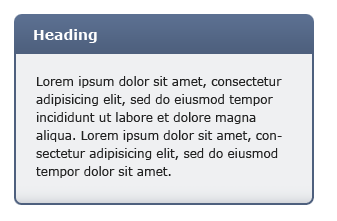
Not an unlikely example. The box above has three unique sections, the header at the top, the middle area which repeats itself, and a bottom section with the rounded off corners and a slight shadow.
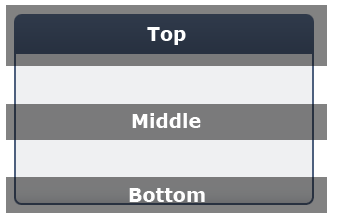
One of the traditional ways of coding such a box would be to slice it into three images for each corresponding part (the middle section would just be a 1 pixel high image, since it’s to be repeated) and then apply them to three individual sections of the HTML. However, we want to use just one image, so we’re not going to cut anything up.

We do however, need to make sure the image is high enough to support scaling vertically — so the image I’m making is 1000 pixels in height. For real usage you may even make it higher than that. This part of the implementation is what puts me off — it doesn’t feel right to make such huge images — but for the sake of getting this implemented, let’s carry on. Oh, I must also note that making 1000 or 10000 pixel high images won’t really affect the file size very much since the middle part is repeating itself (at least using PNG compression).

Ok, so you’ve got the same image as above, except very tall. What next? Next we’re going to implement the HTML. Here’s what the markup might look like:

<div class="content_box">
<h2>Heading</h2>
<p>Some text here...</p>
</div>

Nothing out of the ordinary here. We’ve got the div holding the contents together, a heading at the top and then followed by a paragraph or two of text. To use one image on this markup we simply need to apply it as a background image to both, he parent div, and also the heading. The difference is that the parent div will have the background positioned to the bottom, and the heading to the top. As the content inside the div expands, the background will slide out under the heading image to reveal more. Here’s the CSS (I’ve added some padding and styling specific to my example above):

.content_box {
width: 300px;
background: url(background.png) bottom;
padding-bottom: 3px;
}
.content_box h2 {
background: url(background.png) top;
padding: 9px 15px;
color: #FFF;
font-size: 0.84em;
}
.content_box p {
padding: 0 16px;
font-size: 0.75em;
color: #222;
}

That’s it. The final styled result will look something like this (above example in Safari):
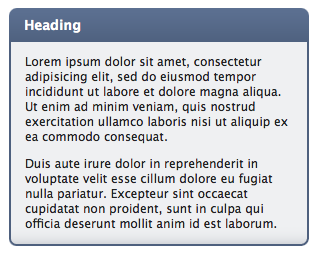
And there you go — scalable content boxes using just one image. Grab the full source code to the example above here.

Is it practical? I’m not sure. For one thing there will always be a limit to how far the image will scale, since that will be dictated by the image height. Another thing is that this method doesn’t feel right — it’s a hack. Having said this, the alternatives are only a little less hacky, since we have to slice up images into parts — that’s not ideal either.

What do you think? Post a comment below.

Update [28 Nov 2008]: Sebastian has posted a better solution in the comments. His method utilizes left and right positioning as well as top and bottom, enabling us to cut down the image size drastically. In-fact, his solution looks practical for production use. Here’s the live demo + background image used. Just look at the image and the markup and the method will instantly become apparent. Thanks Sebastian :)

Share/Save/Bookmark

Enjoyed reading this post?
Grab the RSS feed here and get all new posts delivered straight to you.

46 Comments:

  1. Dave K

    This is an adaptation of the “sliding doors” technique, you may wish to Google that and “css sprites” A List Apart has articles on both and you can implement this more efficiently using a smaller single image and better selectors.

  2. Dmitry

    Dave: I am familiar with those :) How would you use a smaller image though?

    The only way I can see is to assign an offset background (to hide the header) to the paragraph elements. In this way the image would need to be high enough to account for the longest paragraph. You can then add some padding large enough at the bottom of the main container to ensure the bottom piece of the background shows up ok and doesn’t get obstructed by the paragraph background. This is all more fiddly though :)

  3. John

    Great post Dimitry, I’m probably going to use this in the near future.

    For my own projects I’ve taken to using the css properties:
    -webkit-border-radius: 20px;
    -moz-border-radius: 20px;
    border-radius: 20px;
    IE wont get the rounded borders, but hopefully someday they’ll catch up, I’m okay with that.

    For projects that aren’t okay with this compromise I’ll probably be taking a look at your technique, thanks again.

  4. Myles

    Dmitry,
    Nice post (of course).
    I played with this particular version of the technique with an extremely large image.

    It is a good solution but has some flaws that we should be aware of.

    1. You can’t use a vertical gradient as you need the middle to tile (if you’re clever about it though you can introduce some gradient elements in the top and bottom of the div though.

    2. If a content box that holds a significant about of text and images, meaning the vertical hight of any one page could be more than the image size and so the background will repeat and the page appears to be broken.
    You can compensate by making the height of the background image extremely tall (such as 10000px which may not even be enough still) however there are two major draw-backs even to this.
    Firstly the time it takes to create a 10000px version of the background in Photoshop is not acceptable as at these resolutions it gets very fiddly to use the transform, marquee and zoom tools. Imagine multiplying this extra time spent if there are quite a few boxes in your draft that need to be converted.
    Secondly, the filesize DOES increase even with .png or gif. A 300 x 200px graphic only a couple kb but the same image extended to 300 x 10000px is a whupping 20kb, that’s a whupping 100% increase in file size. 20kb could be acceptable but in most cases it’s not for me because if I have 10 of these boxes, I’ve suddenly added an additional 200kb which is a lot of extra bandwidth on a high traffic site…

    So as long as you are aware of these limitations and are fully confident that the vertical height of the box will not exceed the image dimensions, then go for it!

  5. very

    Wouldn’t a large 10000 x 300px image be slower for the browser to render? Probably consuming more memory than smaller image?

  6. Scott

    @Myles: If you are using this technique for a very large container, then you’re using the wrong technique. For something with significant content, there are much better ways - such as splitting the top, center, and bottom sections of the image and using them as backgrounds on nested DIVs.

    This technique is best used for sidebar components, as the original article states.

  7. Bogdan Pop

    I am not sure if IE fixed this, but older versions, like IE 6 had serious issues with rendering big images. I know I tested this with a 10.000 X 10.000 pixels mate color photo, which not only rendered the IE into “not responding” mode, but after doing 2 or 3 clicks around the browser box, I got a blue screen of death with a cryptic error.

  8. Sebastian Steinmann

    Not to rain on your parade. But this can be done with one image indeed, but it needs not to be 10000px high in this example.

    Check my proof of concept here:
    http://sebs.ng5.as/files/content.html

    It’s a bit more css, but better than a huge image.

  9. Sebastian Steinmann

    For those who dont get it, this is my background image:
    http://sebs.ng5.as/files/background.png

    A bit smaller I would say..

  10. HBR

    @Sebastian: GREAT
    The solution seems so obvious once you read the code, but nobody here thought about it :s.
    I used to split my images into 3 parts, now I will be using your technique :)

    Thanks for the tip.

  11. Tor Løvskogen

    Yeah, it’s great – but it’s only a valid solution when the graphic is so simple. But if the graphics were richer (e.g gradient, more sophisticated borders) it’s useless.

  12. Sebastian Steinmann

    So I should fix that too then? Well ok:
    http://sebs.ng5.as/files/content2.html
    Using http://sebs.ng5.as/files/background2.png

    Still wont support vertical gradients on the content, but what will..

  13. Tor Løvskogen

    That’s better :)

  14. [...] Usability Post: Scalable Content Box Using Only One Background Image [...]

  15. Web Design Brisbane

    This is fantastic thankyou. Sebastian, it’s funny how thing become obvious when you look at another way of thinking through the problem thanks.

  16. Riccardo

    Nice idea, Sebastian, I’ll keep that in mind for my next design! Thanks!

  17. Dmitry

    Sebastian: That’s amazing! Definitely something I will think about using instead of my silly large image idea. Also, it’s a little cleaner than slicing stuff up into separate images. Actually, looks a bit like the texturing 3D models, where you map different parts of the texture onto different areas of polygons :)

  18. Thijs

    @Sebastian.
    Excellent, very impressive response :-) It all seems so logical now. This brings a smile to my face!

  19. franky

    Sebastian, nice thinking. Too bad you sound so snotty. With a bit more grace, you could be solving CSS conundrums AND getting invited to parties.

  20. Leo Horie

    @Dmitry: your technique is still useful for boxes with vertical gradients (though, granted, there are some limitations)

    I often use a combination of this technique with sliding doors to make a variable width version, since I often work with widget-like things.

  21. Gregorio Espadas

    I love this post! and the great idea of Sebastian. Thanks both Dmitry and Sebastian!

  22. seo nedir

    thanks for creative thinking

  23. Myles

    @Sebastion’s technique:

    I tried this solution as well and it feels better to use than the large height solution however it also has a couple drawbacks:
    If there are other elements in the box that aren’t nested in tags you need to acocunt for these in the CSS and assignn width and background to them as well.
    If other tags in the box have additional margins or padding, the background will be offset or it will stick out of the box.

    So it ultimately got too fiddly and the extra time CSS’ing was not worth it.

    After extensive revisions and testing, the best compromise between nice clean CSS/Mark-up as well as speedy implementation for ME is to use two images.
    One is the whole box, usually extracted straight from the Photoshop draft without resizing or editing or extra slicing.
    The second is taking from this whole box, I crop the image in the middle to a one pixel cross-section which will be my tiled background.

    The mark-up is similar to this except I have a wrapper div for the content and assign the background to be repeated to the content div.

    I hate adding extra superfluous mark-up but this is the best and most robust compromise I have found for a solution yet.

  24. Dmitry

    Myles: I guess you could wrap all the contents in another div, which will repeat the middle portion of the image (aligned right). I think it’s elegant and saves on having to ask the server for multiple images.

  25. Myles

    Dmitry: That won’t work because when the content is tall enough, it will show the top and bottom of the background image.

    Or am I missing something? :)

  26. Myles

    Just actually took a look at Sebastion’s background image(!)

    This solves the issues I just raised.
    Will take a fraction longer to create an image like that but it works well as a solution. Good job guys!

  27. [...] Dmitry looks at a Scalable Content Box Using Only One Background Image [...]

  28. Ben Reimers

    Does this work in IE with a PNG fix? As far as I know you cannot position PNG background images with transparency in IE (I’ve tried … it gives me grief).

  29. Dainis Graveris

    really nice tips You got here, I am really glad I found Your website!

  30. Dmitry

    Ben: As far as I know this (http://labs.unitinteractive.com/unitpngfix.php) is the only PNG fix that will do background images in CSS. It will stretch them to the size of the container though, so not ideal. For sites that need IE6 support I tend to just serve non transparent images as long as you know the color of the background they sit on.

  31. [...] Scalable Content Box Using Only One Background Image [...]

  32. Art

    Nice article and replies, but I don’t see how this differs from 456bereastreet’s approach, which dates back to June 2004. The article is here: http://www.456bereastreet.com/.....easer_box/. I have been using that method for years now, whenever a scalable content box with bg image is needed. Cheers.

  33. Dmitry

    Art: It doesn’t, thanks for the link :)

  34. [...] Scalable Content Box Using Only One Background Image 角丸のボックスを1つの背景画像とCSSで実現する方法 [...]

  35. [...]  さほど革新的なワザではないんですが、ちょっと目からウコロだった記事があるので、ご紹介します。 Scalable Content Box Using Only One Background Image [...]

  36. [...] Usability Post » Scalable Content Box Using Only One Background Image (tags: development scalable) [...]

  37. Mike

    This is great! Nice job Dimitry and Sebastion. I saw something similar before and have been meaning to try this. Now what happens if you don’t want a header? I was playing around with a couple options and the only thing I could quickly come up with was keep an empty header but style it like this:

    h4 {font-size:0;margin:0;padding:0;}

    and have your be the repeating image

    Really ugly hack, but it works well in all browsers, although validation may be another issue :)

    Any thoughts?

  38. [...] Usability Post » Scalable Content Box Using Only One Background Image Pretty simple tutorial on using One background image to create a scalable content box (tags: design howto image corner xhtml photoshop web webdesign article html development tutorial CSS Tutorials layout images code resource Web_Design background Content roundedcorners scalable box) [...]

  39. John Faulds

    Another limitation of this technique to be aware of is what happens when someone using a non-zoom browser tries to increase the size of the text - the text of the header soon spills out of the portion of the graphic meant to hold it. The same would be true for headings that take up two lines.

  40. Ramm

    Nice solutions here, i’ve been using a long image for the box, and anothe one for heading for a long time. I think it’s a clean solution, because, who wants a 1000px (or 10000px) box anyway? I try always to limit the boxes to 400 or 500px to enhance readability, and that way i can still use gradient backgrounds in the boxes.
    The other solution by Sebastian it’s also very interesting. May be very usable in many cases.
    Thanks for the post.

  41. Jason Wong

    The only remaining issue is lack of horizontal stretchability. Hedgerwow has an implementation of this that uses a little more markup, but still semantically clean, and stretchy in all directions.

  42. Nathan Ziarek

    And this only works if the user keeps their text-size at the size you’ve described. As you increase the font-size, the word “Heading” falls off the background. Easy to fix with sliced images — the solution here (with the existing HTML) is less so.

    Still, Sebastian’s work is very neat. Such a simple spin on an idea, and yet it is sort of revolutionary.

  43. Ben

    Great solution, thanks for sharing this. I was very happy to see that it works just fine in IE as well :)

  44. jacobr

    Hmm, yeah it’s a nice technique, only thing is that it isn’t any different from 456bereastreet’s technique as one user has already pointed out.

  45. Kian Ann

    Good Stuff Sebastian

    Actually the big image file technique is used quite widely - so long as the page is managed well, it is alright.

    Even the main page of Yahoo.com uses 1px by 1600px long image files

    Another interesting one I observed that allows one image for different width boxes is alibaba.com - see the sidebars vs the boxes in the middle. They are all using the same bkg img. :)

  46. vishal taywade

    Nice solutions here, i’ve been using a long image for the box, and anothe one for heading for a long time. I think it’s a clean solution, because, who wants a 1000px (or 10000px) box anyway? I try always to limit the boxes to 400 or 500px to enhance readability, and that way i can still use gradient backgrounds in the boxes.
    The other solution by Sebastian it’s also very interesting. May be very usable in many cases.

    Thanks for suggestions.

Post your comment

Credits: RSS icon designed by Function.
Powered by WordPress.