29
Dec
2008
36

A Slip in the WordPress 2.7 Dashboard Interface

There is a curious design element in the new WordPress 2.7 admin dashboard. The ‘Right Now’ box shows a collection of latest statistics about your blog, such as the totals of all your posts, categories, tags, comments, spam and so on. Here’s what it looks like:
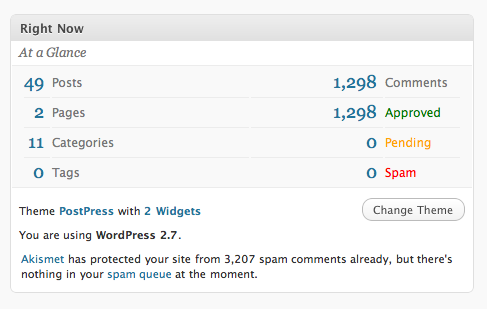
Now, the left columns isn’t actually related to the right. The left deals with the totals of all posts on your blog. The right deals with comments. Yet for some reason they’re placed side by side and each element has a line under it, spanning the whole width of the container. This results in pairs of statistics.

When I first saw this I was trying to figure out why the posts total was related to the comments total and why the 0 tags bit was next to the 0 comments bit. Of course there was no relation at all. The underline is used to separate each number, but for some reason the designer decided to span it the whole width, connecting the two separate statistics in the process.

This is confusing and should definitely be split up. Here’s a quick mockup I prepared earlier:
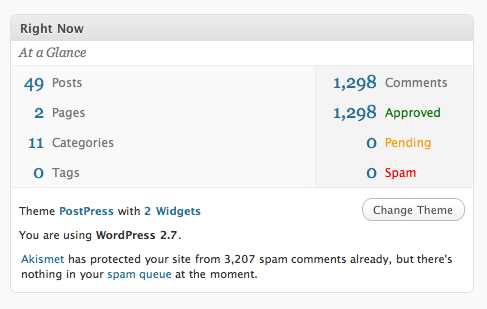
Not perfect, but already it’s easier to see the two separate groups.

Overall, I really like the new WordPress 2.7 interface. It’s not only better organized, but it’s also a little bit more polished, which gives a better user experience. Anyone else running 2.7? What do you think of the new UI?

Share/Save/Bookmark

Enjoyed reading this post?
Grab the RSS feed here and get all new posts delivered straight to you.

36 Comments:

  1. pickupjojo

    You’re sooo right, it disturbed me a lot since the last upgrade. But I love the new UI and which looks more ’smooth’ (but not obviously more usable).

  2. styletime

    Sorry What have you changed in your mockup?

  3. Mr. Serge

    The thing I hate most of 2.7 is linking. Everytime I would like to see post someone made comment to or look over the earlier posts I just get angry. All links are sending to Edit Comment or Edit Post, not to see actual post. I still can’t get it.

  4. Jin

    I’m still on 2.6, scared to click on that 2.7 upgrade link… what if my blog blows up? :)

    I have seen the videos released by the WP UI designer though. I’m impressed by the thoughts put into it. But I’m sure there are little quirks like the one you pointed out.

    I’m more curious about the decision on a brand new interface and layout. It seems to me most re-designs are progressive, and subtle. The jump from 2.6 to 2.7 is rather huge. Was there any learning curve for you using 2.7?

  5. Chris

    I agree with your observation. It took a few looks to “get” the layout of that box. The full span underline does seem to insinuate that the left and right correspond to each other. Overall its minor compared to the rest of the UI, but an easy fix none the less.

  6. Dmitry

    pickupjojo: It’s definitely “smoother” — I think it has a lot to do with some javascript transitions, but generally the UI is a bit more coherent as well.

    styletime: I removed the horizontal lines under each statistic and added one vertical line. Very subtle :)

    Mr. Serge: Oh yes!! That is so annoying! I can’t stop clicking it. I see the comment or a trackback and I just click on the post link expecting it to go to that post page… but no.. it has no to go the edit page for some reason. Totally out of context.

    Jin: Not much of a learning curve. I don’t think it’s that different. It’s mostly just changed from a horizontal navigation bar, to a vertical one on the side. The sections are all the same, and the content within them is pretty much the same as well. I don’t use all of the WordPress features, but the basics haven’t changed much :)

  7. Bram Van der Sype

    I noticed it too right away. I think you’re mock up looks good, though I’d consider putting the vertical line in the middle of the container. And somewhere it should say “this part is about your posts, this part is about your comments”, because now you really gotta guess.

    As for the general layout: it’s a bit like Office 2007: on the whole, it’s a better experience: it looks better, the UI is better and things are where they should be: but we’ve been so used to something else, it’ll take some time to adjust.
    Luckily the transition from WP 2.6 to 2.7 wasn’t as abrupt as from Office 2003 to 2007…

    I also agree with Mr. Serge: the links annoy me A LOT. But that’s not just 2.7, they’ve been there since 2.6 (maybe even earlier?).

  8. Simon Sigurdhsson

    I really like the new interface in 2.7, I think it’s more thought through than the old interface. I also like the new plugin install system, makes things easier.

    I didn’t really notice what you pointed out, I wasn’t really bothered by it, but I guess you’re right… it does make more sense the way you suggest it should be done.

  9. Dmitry

    Bram: fixed ;)

    I love the Office 2007 transition. I’ve been following the blog of Jensen Harris, the UI lead, and it’s been fascinating to see how they approached all the problems and came up with the new interface. I actually discovered a lot of new features through the ribbon interface because now they weren’t hidden away.

  10. Paul Davis

    I’m running WP 2.7 and really quite like it.

    And since I worked out how to style the comments (nested ones) I’m in love.

  11. Travis

    Good suggestion.

    And I think the links in that Right Now panel should all display as block. Having to click on single digits is a bit of a UI pain.

  12. Peter Kahoun

    Too many changes in a single step.

    The navigation imho wasn’t tested enough. At least - I don’t consider it as usable. Ozh’s drop-down menu still has its sense.

    The save/publish-box was nicely presented somewhere some time ago but in fact - I don’t like to use it either (4 clicks to change the privacy status, god!).

    Result: looking forward to 2.8, where I expect much things to be fixed/modified.

  13. Steven Clark

    I’m not entirely sold on the mockup solution - a single column would be more effective. Even with the subtle lines it implies that 1,298 pages are approved. To have the two columns there needs to be a logical heading on one side saying “Pages & Posts” and on the other “Comments”, because both are different groupings entirely. Just my take on it, either single column or logical headings seems the most obvious because even putting in subtle graphic division still implies relationship due to the container as it is at present.

    I’ve upgraded to 2.7 and although it was initially a pain it didn’t get that long to catch up to speed. That being said I do feel that WordPress is becoming about features for the sake of features, a danger to any software application in the long run. The more features the more you need in the interfaces, thus they become crowded and complex by necessity. But it seems to be the path of WordPress, and enough fanboys are pushing for constant new features that I don’t see that changing for a long time. Don’t get me wrong, I’ve used WordPress since the beginning almost exclusively, mostly for it’s ease of use and simplicity for clients.

    It might be a logical time in the near future to fork WordPress, if complexity for power users is the goal, so that we have “basic WordPress” that achieves most very basic goals for us, and “power WordPress” which provides for all the extras. The first interface doesn’t need the Quick Posts or the running count of comments or even to manage theme editing for that matter. Just post and manage comments.

    I’m not sure if this feature exists or is in dev but I’d ask for the ability to shut off (temporarily) any and all features and interface components that I do not want to use. Even comment management, even dashboard. Give me simple, customisable interfaces in the admin. Again that’s just my opinion - usability is not simply about putting everything onto the same screen and saying “there it’s available”. Some things were initially not obvious in 2.7 and took some looking - and I’m a WordPress developer…

    However, 2.7 is the way forward so upgrading is the way to go. It didn’t stop my world, just made my business life a little more complicated. The right now panel is simply indicative of the adding of complexity for the adding of features… just some thoughts in passing.

  14. Chris Dary

    Great thought, Dmitry. Have you filed a ticket for this? http://trac.wordpress.org/

  15. coda

    Good point. I would also remove the “At a Glance” text because it serves little value. And move the “Change Theme” button closer to the theme text rather than have it right-aligned, since they are related.

    I agree with Peter, I don’t think the navigation in 2.7 is good enough and I have a feeling it won’t survive very long. The accordion menus grow in height as you add plugins, so it becomes increasingly difficult to keep track of which links are where when the accordions are open or closed. When multiple menus are open simultaneously, you have to scroll the page too because of the total vertical height, which is just unnecessarily cumbersome and time consuming.

    Also there’s a learning curve involved with understanding the behaviour of clicking on the arrow icon to toggle an accordion, instead of clicking on the whole accordion header itself which is typical accordion behaviour.

    A horizontal drop-down approach (Ozh’ Admin Drop Down Menu) is much more practical.

  16. Dmitry

    Steven: I definitely agree that my solution isn’t ideal. It’s not really how I would have done it — just a simple tweak to make it a little bit clearer. All the points you mentioned are valid so it’s going to need more reorganization to make it make better sense.

    coda: Good point about the text. Neither “Right now” or “At a glance” mean very much. I’d get rid of both and just have something less ambiguous like “Statistics” or “Summary” or something like that.

  17. Good Usability

    Ideally I wouldn’t have them side-by-side at all. But if they needed to be like that I’d remove all the shading from the left and right columns.

    Remove the border line and underlines from the left column.

    Keep the lines underneath the entries on the right and shade the top one (total comments).

    I really should get Photoshop so I can mock these things up rather than talk about them.

  18. Jon Phillips

    I gotta say I had the exact same reaction when I first installed WP2.7 - something like ‘what does the # of pending comments have to do with my categories, etc…’ Would’ve been nice to simply make this 2 boxes instead, I would take your example a bit further, here’s my mock-up (not perfect, did this real quick): http://spyrestudios.com/files/wp_right_now.jpg :)

  19. Renata

    I really enjoyed your idea. I would also sugest a stronger hightlight to “post” and “comments”, maybe even as a title.

  20. Lauren

    I had that same thought when I first starting using the new interface, so I’m glad I’m not alone. I agree that the comments stats needs to separated out, or else it looks like a subset of the items to the left.

    I do like the new interface overall much better. I think it’s much more user-friendly, and doesn’t take multiple, unnecessary clicks to do something simple.

  21. [...] Usability Post: A Slip in the WordPress 2.7 Dashboard Interface [...]

  22. Brian

    I noticed the same thing when I first fired up 2.7. Definitely an inconsistent design choice among the rest of the great improvements in 2.7.

    Love the new look of UP!

  23. Matthew

    Hmm, this is a great point I hadn’t really thought of before. I noticed it but didn’t think of why it confused me.

    On another note, I love the feedback in comments you’re getting! It’s awesome!

  24. Dmitry

    Jon: That’s the best solution :)

    Brian: Thanks.

    Matthew: Yeah, I think the discussion part of the blog posts here is more valuable than the posts themselves in most cases :)

  25. [...] Design & Product Experience… http://www.usabilitypost.com/2.....interface/ A interesting look at a simple and quick tweak to improving the Usability of a prominent element of [...]

  26. Jeremy Horn

    Awesome. Love the demonstration of how a small, and well deserved, change to the Wordpress dashboard can have large impact on the Usability and understandability of the content within. I am recommending this to my readers for their Weekend Reading…

    http://tpgblog.com/2009/01/02/.....nnovation/

    Jeremy Horn
    The Product Guy
    http://tpgblog.com

  27. Ranie

    I absolutely love how they gave IE the finger and used border-radius (FF, Chrome, Safari…)… That’s a huge statement for such a widespread script.

    I do love the new interface BUT there Is something not right with the new left main menu. Maybe Its the way they split up major sections, or not clear enough were you are, not totally sure, I’ll have to take a look and use It more.

  28. Markus

    I would actually prefer an approach like this: http://img381.imageshack.us/im.....nowmh9.png
    I moved the total comments value to the left because it is similar to the other 4 options. The approved/spending/spam options are technically sub-items and that should be reflected in the design. What do you guys think?

  29. Tarandon

    I totally agree with the UX problem, this tripped me up at first, wondering how I could have 0 spam tags. I do like the new interface however. Really slick and polished like you mentioned.

    My one point of contention is the lack of category selection for the quick posts on the dashboard. I don’t like having to save as a draft and then pick the categories afterward.

    Thanks for the article, that cleared some things up for me.

  30. Peter Kahoun
  31. June

    I haven’t really thought about it, and wasn’t bothered by it…though when you pointed it out, it did make a lot of sense. You know, one of those tiny details that your brain probably notices, but you’d overlook because there are a lot of other things trying to get your attention. I’ve been using WP 2.7 for a while already, though it’s quite getting used to. Nice post. :)

  32. [...] Another thing from Usability Post is about dashboard: A Slip in the WordPress 2.7 Dashboard Interface. [...]

  33. Corblellime

    s cialis pasquinade

  34. Christopher Ross

    I’ve had a number of problems teaching non technical users how to use 2.7 so this isn’t much of a surprise to me. The interface redesign wasn’t a big deal to me but the new structure is too light and hard for older users to read. Add to that, simple usability mistakes like these statistics and you get an interface that’s a real pest.

  35. Luke

    I’m glad I found this entry, because I was going mad thinking this was broken on my site…

    Because some of us using WP as a CMS will NEVER want comments open, but we’d love to know of draft posts still pending at the “Right Now“ level… Because we never use comments, I didn’t realise that “Pending” meant only that…

    So how do I get my non-techie editor now to see the pending posts for her approval?

  36. aburderie

    very intresting

Post your comment


Credits: RSS and guest post icons designed by Function.
Powered by WordPress.